


- Strong FCA regulation
- Segregated client funds
- FSCS & negative balance protection
- Competitive Standard account pricing
- Advanced xStation 5 tools
- Inactivity fee applies
- Overnight financing charges
- Currency conversion fees
- Crypto CFDs restricted for UK retail clients
- Fees vary by account type
Forex.com is regulated by the Financial Conduct Authority (FCA) in the UKForex.com is regulated by the UK’s Financial Conduct Authority (FCA), which oversees its operations for traders in the UK. This regulatory status requires client fund segregation and adherence to strict capital requirements.
Forex.com holds regulatory licenses across multiple jurisdictions and participates in investor compensation schemes, extending its oversight beyond the UK and reinforcing its overall trustworthiness for traders. These protections reduce counterparty risk when depositing and trading funds.
Forex.com charges spreads on major currency pairs and offers separate account types for standard and commission-based trading. Fee structures vary depending on the account tier and trading volume selected.
Opening an account with Forex.com requires identity verification documents, with the account approval process generally completed within a few business days. Once verified, traders log in through a dedicated portal to access trading platforms and account management tools.
Forex Bit examines these safety credentials, fee structures, and account setup details in full below, starting with whether Forex.com is safe and regulated for UK traders.
Is Forex.com Safe and Regulated for UK Traders?

Yes, Forex.com is safe and regulated for UK traders, operating under FCA authorization with client fund segregation and negative balance protection. This overall trust profile rests on a few core pillars covered individually below, including the parent company structure, fund protection mechanisms, and compensation scheme eligibility for UK clients.
Forex.com’s UK entity operates under StoneX Group, a publicly listed financial services company that backs the broker’s capital strength.
Forex.com segregates client funds from company operating capital, a standard FCA requirement that limits exposure if the broker faces financial difficulty. Negative balance protection further prevents UK client accounts from falling below zero during volatile market conditions.
UK clients trading with Forex.com qualify for coverage under the Financial Services Compensation Scheme (FSCS), which protects eligible client funds up to a set compensation limit.
Combined with its multi-decade operating history and multi-jurisdictional licensing, these factors support a consistently strong trust score among regulated UK forex brokers.
What Licenses and Regulators Oversee Forex.com?
Forex.com operates under multiple regulators worldwide, with UK clients registered specifically under the FCA-authorized entity. This licensing structure connects directly to the broker’s overall trust profile already established through fund segregation and FSCS eligibility.
Forex.com is regulated by multiple financial authorities across the jurisdictions in which it operates, including licenses covering the UK, US, Australia, and other regions.
Each regulator governs a separate legal entity within the StoneX Group structure, meaning traders in different regions fall under different oversight bodies and protection rules.
UK-based traders sign up through the FCA-regulated entity, which subjects the broker to UK capital adequacy rules, client money rules, and FSCS compensation eligibility as outlined earlier. This entity separation matters because protections available under FCA rules do not automatically extend to clients registered under the ASIC, CIMA, or NFA/CFTC entities.
How Does Forex.com Protect Client Funds?
Forex.com protects client funds through segregated accounts held at tier-1 banks, negative balance protection, and FSCS coverage for UK clients. This fund security structure builds on the FCA licensing and compensation eligibility already outlined for Forex.com’s UK entity.
Client money sits in segregated bank accounts separate from Forex.com’s own operating capital, so company funds and trader deposits never mix on the same balance sheet. Forex.com places segregated client funds with major banking institutions, a practice intended to reduce counterparty risk on deposited capital.
Negative balance protection stops UK client accounts from dropping below a zero balance, even during sharp price gaps or high volatility. This policy shields traders from owing Forex.com additional funds beyond their deposited capital.
On top of segregation and negative balance protection, eligible UK clients receive FSCS coverage. UK clients trading with Forex.com qualify for coverage under the Financial Services Compensation Scheme (FSCS), which protects eligible client funds up to a set compensation limit in the event the firm becomes insolvent.
What Are the Main Features of Forex.com?

Forex.com’s main features center on a broad instrument range, multiple trading platforms, and dedicated support for UK traders. This overview connects to the safety and fund protection details already established for Forex.com’s FCA-regulated entity, and sets up a closer look at each core feature below.
Forex.com offers tradable instruments spanning forex pairs, indices, commodities, shares, and crypto CFDs, giving UK traders access to several asset classes from a single account. Platform choice extends across MT4, MT5, TradingView integration, and a proprietary web and mobile app, allowing traders to select an interface suited to their strategy. Supporting tools include research and charting resources built into these platforms, along with customer support channels available to UK-based clients.
What Trading Platforms Does Forex.com Offer?
Forex.com offers four main trading platforms: its proprietary web and mobile platform, MT4, MT5, and TradingView integration. Each platform connects to the same asset range and account infrastructure already outlined for Forex.com’s UK entity, differing mainly in interface design and toolset.
The proprietary Forex.com platform runs through both a web browser and a dedicated mobile app, giving traders order entry, charting, and account management without installing third-party software. MT4 and MT5 serve traders who rely on custom indicators, expert advisors, and automated strategies built for the MetaTrader ecosystem, with MT5 adding extra order types and additional timeframes over MT4.
TradingView integration links Forex.com accounts to TradingView’s charting interface, allowing traders to execute orders directly from TradingView’s advanced chart layouts and community-built scripts. The mobile app mirrors core desktop functionality, covering order placement, position monitoring, and price alerts, which supports UK traders managing positions away from a desktop terminal.
What Markets and Instruments Can UK Traders Access?
UK traders access six main asset classes through Forex.com: forex pairs, indices, commodities, share CFDs, cryptocurrency CFDs, and precious metals. This range connects directly to the platform choices already outlined for Forex.com’s FCA-regulated entity, since each instrument type trades through MT4, MT5, TradingView, or the proprietary app.
Forex pairs cover major, minor, and exotic currency combinations, forming the core of Forex.com’s product catalog. Indices and commodities CFDs give exposure to global stock benchmarks and raw materials without holding the underlying asset, while share CFDs extend that same structure to individual company stocks.
Cryptocurrency CFDs round out the offering, letting traders speculate on crypto price movement through the same account infrastructure used for other instruments. UK regulatory rules restrict retail clients from trading crypto derivatives, which limits or removes crypto CFD access depending on account classification.
Professional clients classified under FCA criteria typically retain broader access across these restricted instruments, subject to eligibility requirements and risk warnings applied at the account level.
How Do Forex.com Fees and Spreads Compare?
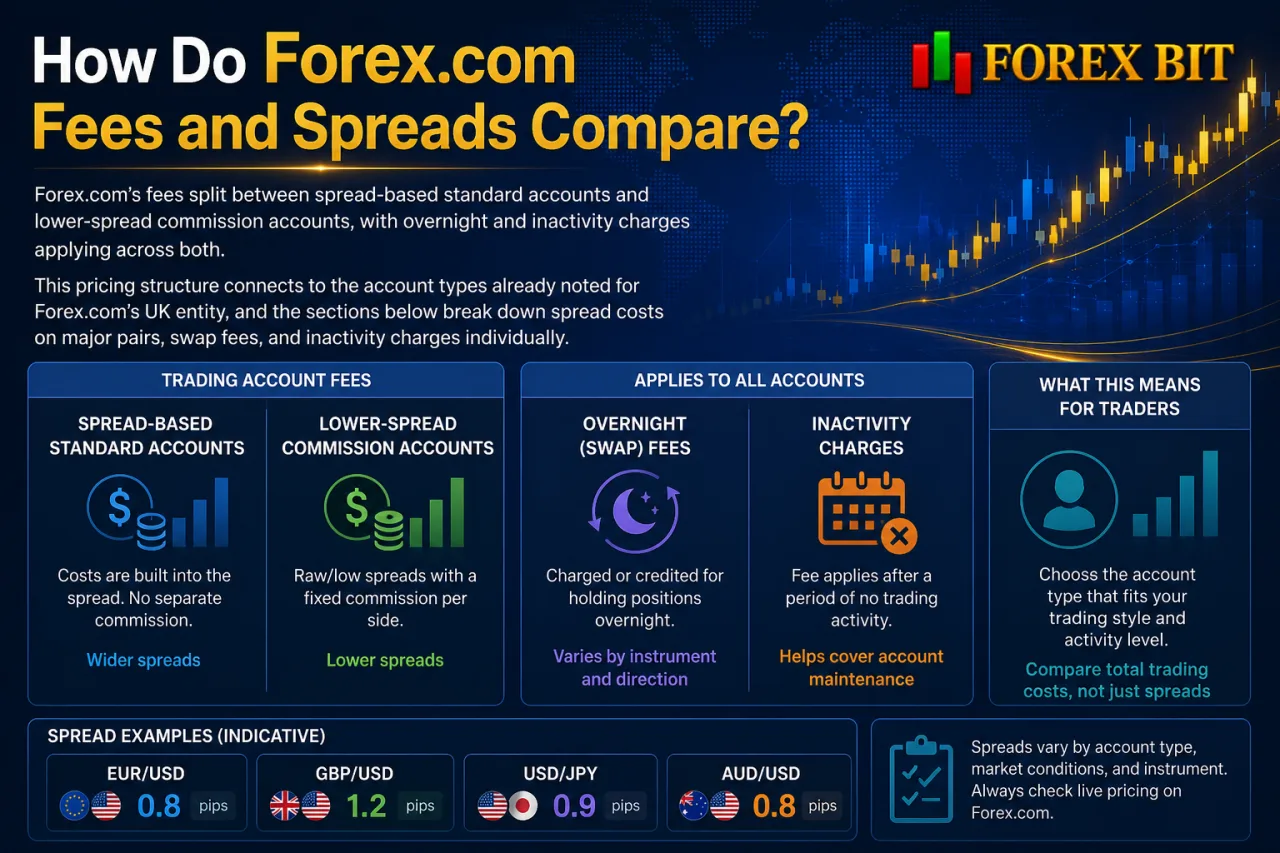
Forex.com’s fees split between spread-based standard accounts and lower-spread commission accounts, with overnight and inactivity charges applying across both. This pricing structure connects to the account types already noted for Forex.com’s UK entity, and the sections below break down spread costs on major pairs, swap fees, and inactivity charges individually.
What Are the Different Account Types on Forex.com?
Forex.com offers two main account types for UK clients: a Standard account and a Commission (RAW) account, distinguished by spread markup versus a fixed commission structure. This account structure connects directly to the fee breakdown already introduced for Forex.com’s UK entity.
The Standard account builds trading costs into the spread, meaning no separate commission charge applies per trade, which suits traders who prefer a single all-in cost per position. The Commission account charges tighter, closer-to-raw spreads alongside a fixed per-lot commission, which typically favors higher-volume or short-term traders seeking lower spread costs.
Minimum deposit requirements and exact commission rates vary by account tier and are subject to change by Forex.com.
Fee structures differ mainly in how the cost is applied: Standard accounts absorb cost into the spread, while Commission accounts separate spread and commission into two visible charges. Account currency, base platform choice, and trading volume can also influence which tier delivers lower overall trading costs for a given strategy.
Does Forex.com Charge Hidden or Additional Fees?
Forex.com applies additional charges beyond spreads and commissions, including inactivity fees and overnight financing costs, though standard card deposits and withdrawals typically carry no extra fee. This additional cost structure connects to the Standard and Commission account fees already outlined for Forex.com’s UK entity.
Forex.com charges an inactivity fee on accounts that remain dormant beyond a set period, deducted from the available balance until the account reactivates or reaches zero, with the exact period and fee amount subject to change and detailed in the broker’s official fee schedule.
Overnight positions held open past the daily cutoff accrue swap or rollover charges, which vary by instrument and position direction. Currency conversion fees also apply when a trader’s account base currency differs from the currency of a deposit, withdrawal, or traded instrument.
Deposit and withdrawal fees generally do not apply through standard payment methods, though certain transfer types or intermediary banks may impose their own separate charges.
How to Open an Account and Log In to Forex.com?

Opening a Forex.com account for UK trading involves online registration, identity verification, and fund deposit, completed through a guided sign-up flow before login credentials activate. This process connects to the identity verification requirement already noted for Forex.com’s account approval timeline, and the sections below cover registration, KYC documentation, funding methods, and login access individually.
What Documents Are Needed to Verify Your Forex.com Account?
Verifying a Forex.com account requires a government-issued photo ID and a separate proof-of-address document, both matching the applicant’s registration details. This documentation step follows directly from the online registration process already outlined for opening a Forex.com account in the UK.
Accepted identity documents typically include:
- Passport showing a valid photo and full name
- Driving licence showing a valid photo and current address
- National identity card, where applicable to the applicant’s nationality
Proof-of-address documents generally include:
- Utility bill issued recently enough to confirm the applicant’s current address
- Bank or credit card statement showing the applicant’s name and address
- Council tax statement confirming the applicant’s current residence
Forex.com cross-checks submitted documents against the details entered during account registration, and mismatched names or addresses delay approval until corrected. Digital uploads through the account portal typically replace physical mail submissions, speeding up the review carried out by the compliance team.
How to Fund and Withdraw Money on Forex.com?
To fund a Forex.com account, UK traders deposit via bank transfer, debit card, or supported e-wallets, with processing times and limits varying by method. This funding process connects directly to the identity verification step already completed during account registration, and the details below cover accepted payment methods, processing speed, and applicable limits for withdrawals.
Deposit methods available to UK clients typically include:
- Bank transfer, processed through standard UK banking rails
- Debit card payments, credited to the trading account after authorization
- E-wallet transfers, where supported for the account region
Debit card and e-wallet deposits generally reflect in the trading account faster than bank transfers, which can take longer to clear.
Withdrawals route back through the original funding method wherever possible, a policy applied to reduce fraud risk and confirm the account holder as the legitimate recipient. Forex.com may apply minimum withdrawal thresholds and request additional verification before releasing larger sums. Withdrawal processing times depend on the payment method and the outcome of any compliance checks conducted before funds are released.
What Unique Tools and Perks Does Forex.com Offer Beyond Standard Trading?
Forex.com offers several distinctive extras beyond standard trading, grouped mainly into proprietary signals, sentiment tools, API access, and a rewards program. This set of perks connects to the platform and instrument range already outlined for Forex.com’s UK entity, and each tool below serves a different type of trader workflow.
Proprietary trading signals and in-house sentiment indicators sit inside the platform ecosystem, giving traders data-driven entry ideas and a view of positioning across the client base. API trading access serves a separate, more advanced use case, connecting external systems directly to the trading account for automated execution. The FOREX.com Rewards program adds a loyalty layer on top of this toolset, rewarding trading activity independently of the platform or instrument chosen.
What Is the Forex.com Rewards Program?
Forex.com offers a Rewards program that credits active traders with points or cashback based on trading activity, which can be redeemed for account-related benefits, though the exact structure and terms are subject to change and should be confirmed directly with the broker. This loyalty layer sits separate from the platforms and instrument range already covered for Forex.com’s UK entity, rewarding activity rather than a specific asset class or account type.
Eligibility ties to live trading activity rather than account balance alone, meaning dormant accounts earn no rewards regardless of prior deposit size. Active UK traders accumulate rewards based on their trading activity, with tiers or thresholds influencing the exact benefit level, though the specific eligibility criteria and reward rates are subject to change and should be confirmed directly with Forex.com.
Benefits typically translate into reduced effective trading costs over time, since accumulated rewards offset fees generated through ongoing account activity. The program functions independently of the Standard or Commission account chosen, applying on top of whichever fee structure the trader already uses.
Does Forex.com Support API Trading for Automated Strategies?
Yes, Forex.com supports API trading for automated strategies, giving developers and quant traders programmatic access to place orders and pull market data outside the standard platform interface. This API access sits alongside the signals and sentiment tools already noted for Forex.com’s toolset, serving a more technical segment of the client base.
The API connects to account infrastructure through authenticated requests, letting a custom-built system execute trades, monitor positions, and stream pricing without a trader manually clicking through MT4, MT5, or the proprietary app. Intended users typically include developers building bespoke trading systems and quant traders backtesting or running algorithmic strategies at scale. Access generally requires an approved trading account plus API credentials issued by Forex.com, alongside coding proficiency to integrate the endpoints into a trading system.
Conclusion
Forex.com stands out as a safe option for UK traders, backed by FCA authorization, segregated client funds, negative balance protection, and FSCS compensation eligibility. The StoneX Group’s financial backing adds further stability to this trust profile. Beyond safety, the broker delivers a well-rounded package: multiple platforms, a broad instrument range, transparent Standard and Commission fee tiers, straightforward account verification, and extras like rewards and API access. For UK traders weighing security, cost, and functionality together, Forex.com meets the core criteria of a regulated, feature-rich broker suited for serious trading activity.
Thomas Dite is the Best Forex Brokers Research Manager at Forex Bit, specializing in researching, comparing, and editing broker-related content for different trader needs. He focuses on evaluating trading platforms, costs, regulation, account conditions, and other key factors to help readers make more informed broker comparisons.
Email: [email protected]