








A forex trading platform is the software traders use to analyse markets, place orders, and manage open positions with a broker. These systems connect traders to liquidity providers and execution servers, turning market data into actionable charts and order tickets.
The main platform types available to forex traders include MT4, MT5, cTrader, and TradingView, each built around different execution models and toolsets. Some platforms prioritise automated trading and custom indicators, while others focus on charting depth or social features.
MT4 favours automated trading through Expert Advisors, MT5 adds more asset classes and order types, cTrader emphasises transparent execution and depth of market, while TradingView centres on advanced charting and community-based analysis. These differences directly affect strategy design, order management, and overall trading efficiency.
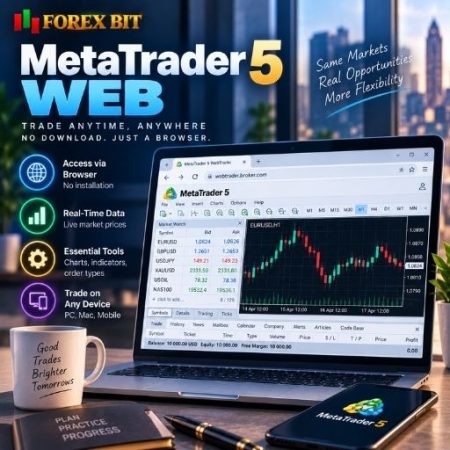
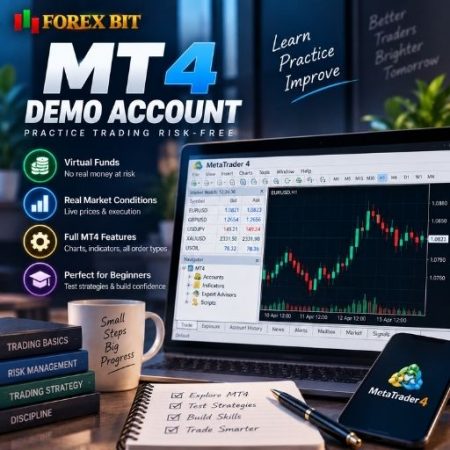
Web and mobile trading extend platform access beyond desktop terminals, allowing chart analysis and order execution from browsers or smartphones. Automated trading tools, built-in indicators, and charting packages vary in depth across MT4, MT5, cTrader, and TradingView, shaping how efficiently a strategy can be tested and deployed.
Order types and platform functionality can differ in execution speed, order filling policies, and available pending order options across MT4, MT5, and cTrader. Understanding these mechanics helps traders match a platform’s structure to their preferred trading style.
Forex Bit breaks down these distinctions to help traders choose a platform suited to their strategy, starting with a clear look at what forex trading platforms actually are and how they function within the broader trading process.
What Are Forex Trading Platforms?
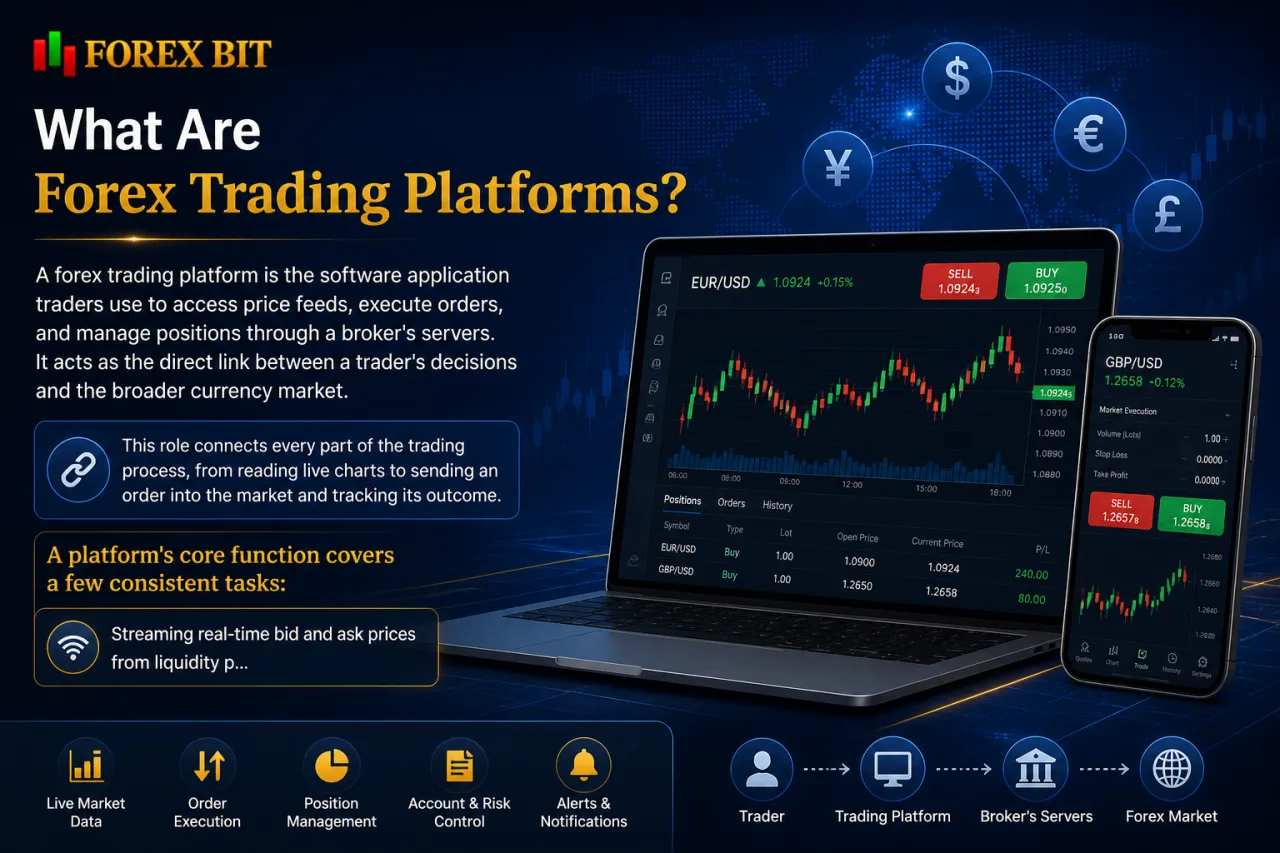
A forex trading platform is the software application traders use to access price feeds, execute orders, and manage positions through a broker’s servers. It acts as the direct link between a trader’s decisions and the broader currency market.
This role connects every part of the trading process, from reading live charts to sending an order into the market and tracking its outcome. A platform’s core function covers a few consistent tasks:
- Streaming real-time bid and ask prices from liquidity providers.
- Executing market, limit, and stop orders through the broker’s infrastructure.
- Displaying account balance, margin, and open position data.
- Supporting chart analysis through indicators, drawing tools, and timeframes.
Platform choice affects execution speed, order accuracy, and the range of tools available for analysis and automation. MT4, MT5, cTrader, and TradingView each structure these functions differently, which shapes how efficiently a trader can plan, execute, and manage a position.
What Are the Main Types of Trading Platforms Available?
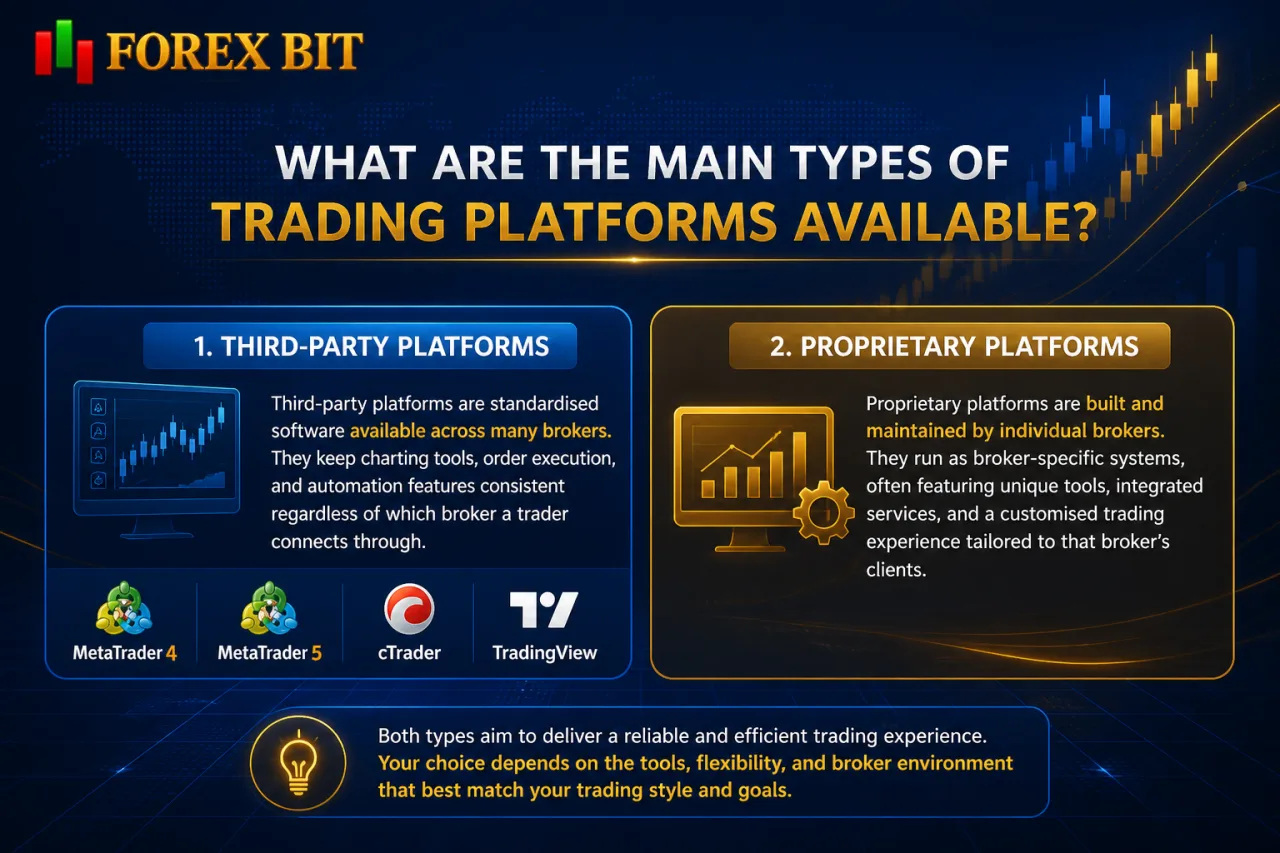
Trading platforms fall into two main groups: third-party platforms such as MT4, MT5, cTrader, and TradingView, and proprietary platforms built and maintained by individual brokers. This distinction shapes the comparisons that follow.
Third-party platforms operate as standardised software available across many brokers, keeping charting tools, order execution, and automation features consistent regardless of which broker a trader connects through. Proprietary platforms, by contrast, run as broker-specific systems designed around a single company’s infrastructure and product range.
- MT4 remains the third-party platform most associated with automated trading through Expert Advisors.
- MT5 extends the third-party category with broader asset coverage and additional order types.
- cTrader represents a third-party option built around transparent execution and depth of market data.
- TradingView functions as a web-based third-party platform centred on charting and community analysis.
- Proprietary platforms operate as in-house alternatives tailored to a specific broker’s tools and account structure.
Each category carries different implications for platform switching, tool availability, and how consistent the trading experience stays across brokers.
MT4 vs MT5 vs cTrader vs TradingView: How Do They Compare?
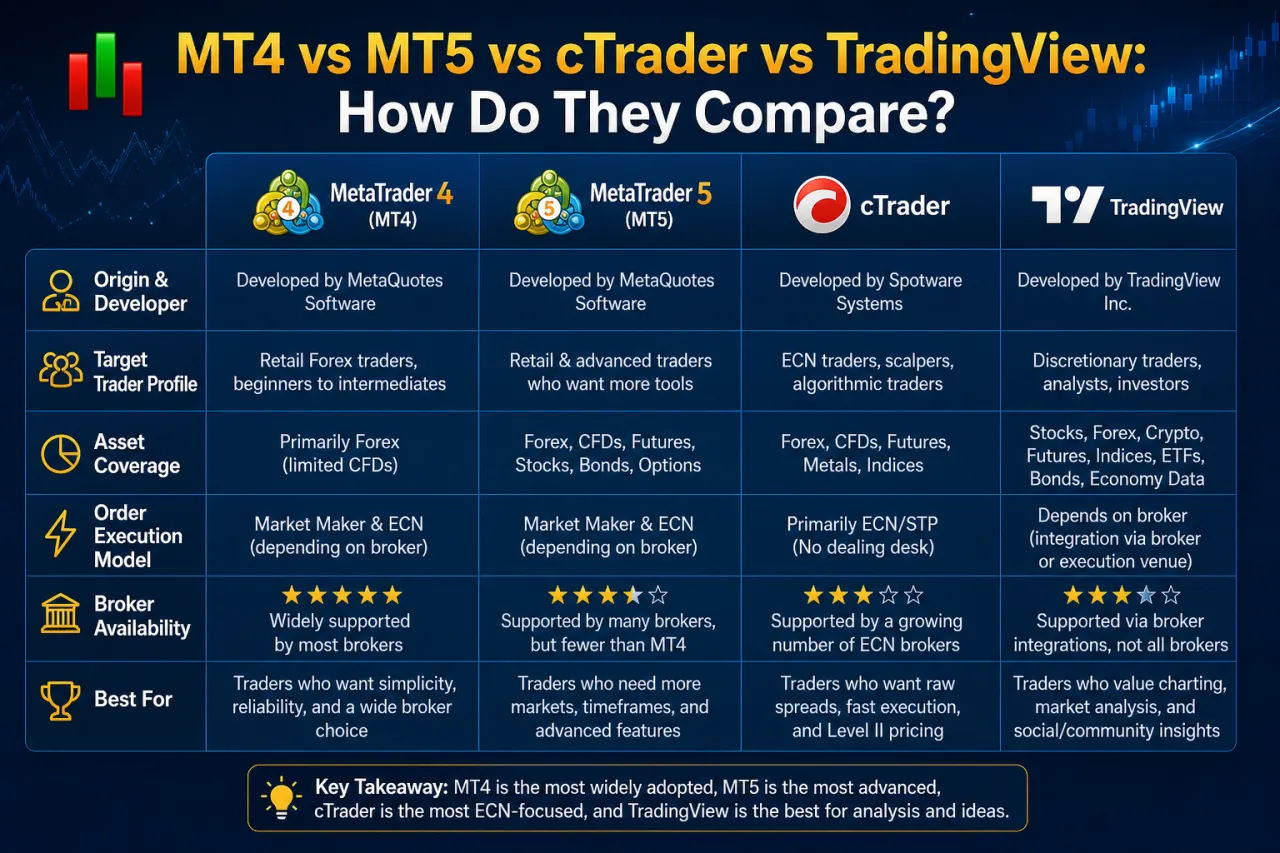
MT4, MT5, cTrader, and TradingView differ mainly in developer origin, target trader profile, asset coverage, order execution model, and how widely brokers support each one. These factors set the practical boundaries for choosing between them.
The comparison below groups the four platforms by the core dimensions that most influence day-to-day trading, from who built the platform to how brokers make it available.
- Origin and developer: MT4 and MT5 come from the same software provider and share a similar interface logic, while cTrader is developed by a separate technology company and TradingView operates as an independent, web-based charting service.
- Target user: MT4 suits traders focused on automated strategies through Expert Advisors, MT5 extends that base toward multi-asset traders, cTrader appeals to traders prioritising execution transparency, and TradingView attracts chart-driven and community-oriented traders.
- Asset coverage: MT5 offers broader asset classes than MT4, cTrader focuses primarily on forex and CFDs, and TradingView’s coverage depends on the connected broker feed.
- Order execution model: MT4 and MT5 rely on broker-configured execution settings, while cTrader is structured around direct market depth visibility.
- Broker availability: MT4 remains the most widely supported across brokers, followed by MT5, with cTrader and TradingView offered by a narrower set of brokers.
What Is MT4 and What Are Its Key Features?
MT4 is a third-party trading platform built by MetaQuotes, structured around charting tools, multiple timeframes, built-in indicators, and Expert Advisor support for automated strategies. This structure explains why MT4 remains a core reference point when comparing platform features across brokers.
MT4’s feature set centres on a few functions that shape day-to-day trading:
- Charting tools covering multiple timeframes, from short intraday views to longer-term daily and weekly charts.
- Built-in technical indicators for trend, momentum, and volume analysis, alongside custom indicator support.
- Order types including market, limit, and stop orders, plus pending order variations for entry planning.
- Expert Advisors (EAs) that automate strategy execution based on coded rules, removing manual order placement.
- One-click trading and position management tools for adjusting stop-loss and take-profit levels quickly.
MT4’s popularity among forex traders stems largely from its EA ecosystem, which supports algorithmic strategies without requiring a separate execution system. Its interface also stays broadly consistent across brokers, so traders switching providers keep a familiar charting and order-management layout rather than relearning a new platform structure.
What Is MT5 and How Is It Different from MT4?
MT5 is a third-party trading platform from the same developer as MT4, expanding on it with more timeframes, additional order types, depth of market data, and multi-asset support. This structure explains why MT5 functions as an upgrade path rather than a direct replacement for MT4.
The differences between the two platforms concentrate on a few concrete additions rather than a full redesign of the interface.
- Timeframes expand beyond MT4’s standard set, giving traders more granular chart intervals for analysis.
- Order types include additional pending order options alongside the market, limit, and stop orders shared with MT4.
- Depth of market (DOM) displays order book data, showing available liquidity at different price levels.
- Asset coverage extends past forex and CFDs into a wider range of markets, unlike MT4’s narrower focus.
- Strategy testing tools support multi-threaded backtesting, speeding up historical analysis of Expert Advisors.
Despite these additions, MT5 does not fully replace MT4 across the industry. MT4 keeps a large EA library and remains more widely supported among brokers, so the choice between the two often depends on whether multi-asset access or established automation tools matter more to a given strategy.
What Is cTrader and What Makes It Different?
cTrader is a third-party trading platform built by Spotware, structured around a clean interface, transparent execution, Level II pricing, and cAlgo for automated strategies. This structure sets it apart from MetaTrader’s charting-first layout and EA-based automation model.
The platform’s design distinguishes itself through a few specific components rather than a general overhaul of standard trading functions.
- Interface layout separates charting, order entry, and account monitoring into distinct, customisable panels rather than a single dense workspace.
- Execution transparency displays order routing details, letting traders see how a trade fills against available liquidity.
- Level II pricing shows depth of market data across multiple price levels, revealing buy and sell volume beyond the top bid and ask.
- cAlgo serves as the built-in automation environment, supporting algorithmic strategies and custom indicators coded in a different language from MT4’s MQL.
These features position cTrader toward traders who prioritise order-book visibility and execution clarity over the broader EA ecosystem that defines MT4. Because cAlgo runs on a separate coding framework, existing MT4 Expert Advisors require rebuilding rather than direct transfer, which affects traders migrating an automated strategy between platforms.
What Is TradingView and How Is It Used for Trading?
TradingView is a web-based charting platform built around advanced technical analysis tools and a community-driven layout, connecting to brokers for trade execution rather than functioning as a standalone terminal. This charting-first design shapes how traders use it alongside a broker account.
The platform’s structure separates it clearly from MT4, MT5, and cTrader, which run as broker-integrated terminals by default.
- Charting tools cover multiple drawing objects, custom indicators, and a wide range of timeframes accessible directly in the browser.
- Community features let users publish and view public chart ideas, scripts, and market commentary from other traders.
- Broker connectivity links TradingView’s charts to a linked brokerage account, so orders placed on the chart route through that broker’s execution servers.
- Script sharing through its indicator library lets traders apply community-built tools without coding them independently.
Because order execution depends on a connected broker rather than TradingView’s own infrastructure, its role in the trading process centres on analysis and idea-sharing, with the broker handling the actual order fill.
How Do Web and Mobile Trading Options Compare Across Platforms?
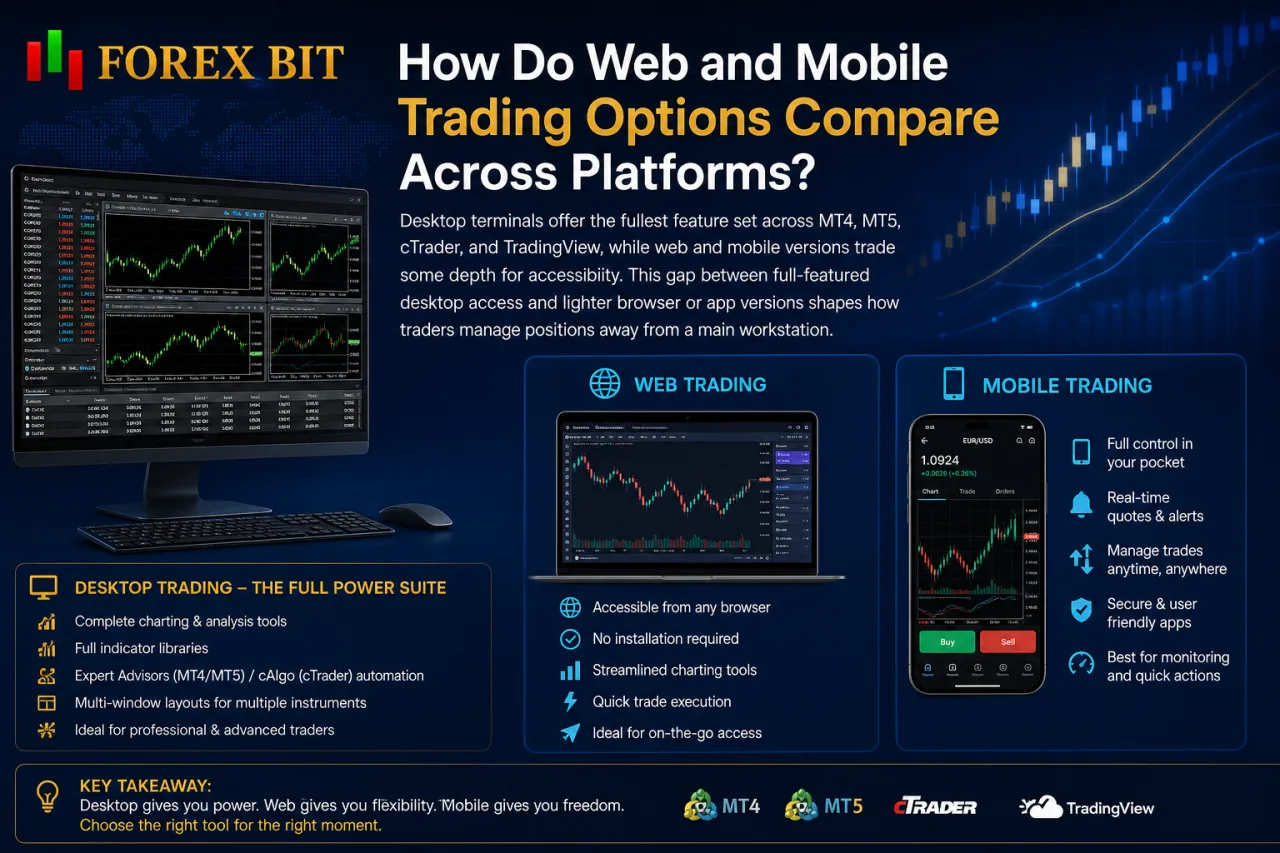
Desktop terminals offer the fullest feature set across MT4, MT5, cTrader, and TradingView, while web and mobile versions trade some depth for accessibility. This gap between full-featured desktop access and lighter browser or app versions shapes how traders manage positions away from a main workstation.
Desktop platforms retain complete charting layers, full indicator libraries, Expert Advisor or cAlgo automation, and multi-window layouts for monitoring several instruments at once. Web versions of MT4, MT5, and cTrader mirror much of the desktop charting and order-entry structure through a browser, though automated strategy execution and deep customisation typically stay tied to the desktop terminal. TradingView’s web interface differs slightly, since its charting tools run natively in the browser rather than as a scaled-down copy of a separate desktop application.
Mobile apps across all four platforms prioritise core functions over full parity:
- Placing market, limit, and stop orders remains available on mobile versions of MT4, MT5, and cTrader.
- Viewing open positions, account balance, and margin levels stays consistent across mobile apps.
- Running Expert Advisors or cAlgo strategies stays restricted to desktop terminals rather than mobile devices.
- Accessing advanced charting tools and drawing objects narrows on smaller mobile screens compared with desktop layouts.
This division means mobile apps suit monitoring and quick order adjustments, while desktop terminals remain the primary environment for automated strategy execution and detailed chart analysis.
How Do Charting Tools and Automated Trading Features Compare?
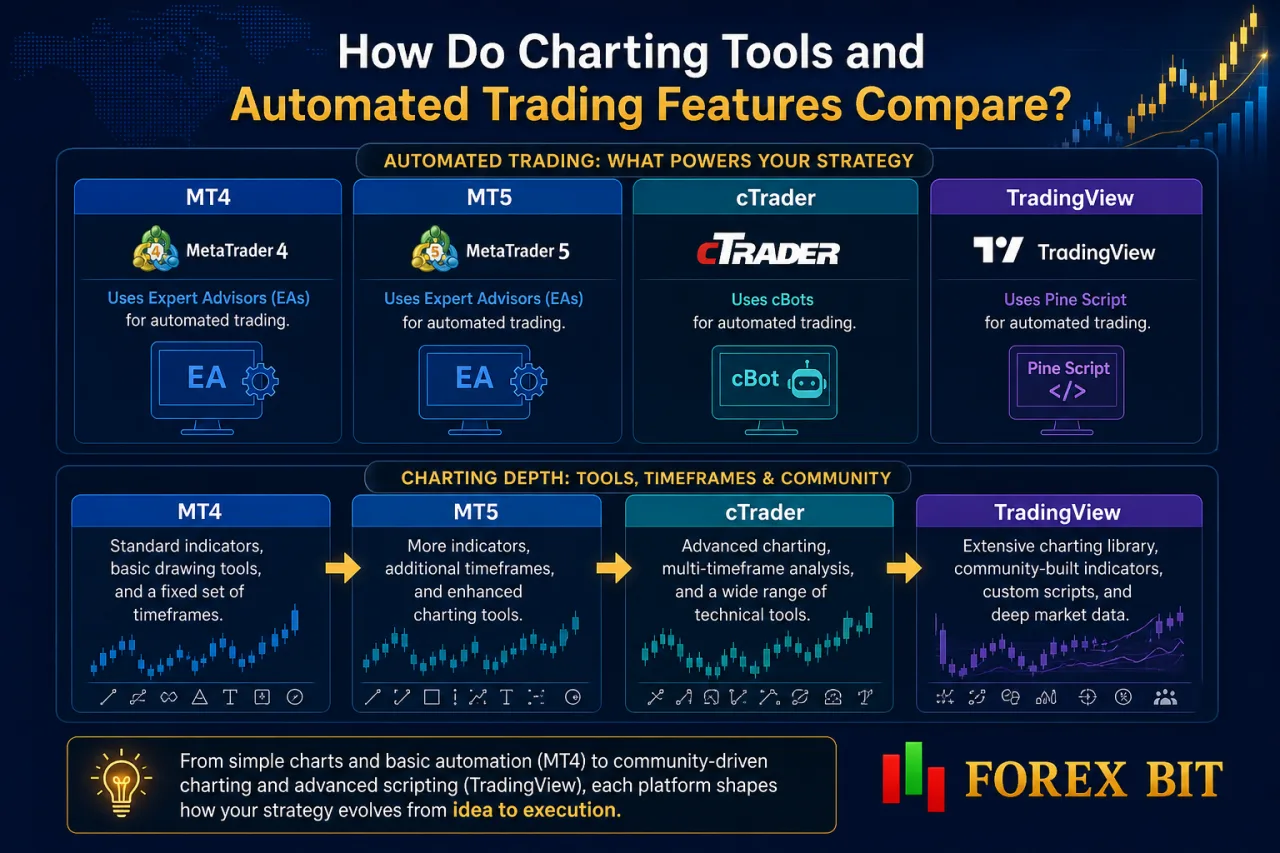
MT4 and MT5 rely on Expert Advisors for automation, cTrader uses cBots, and TradingView runs Pine Script, while charting depth increases from MT4 through MT5 and cTrader to TradingView’s community-driven library. These differences shape how a strategy moves from a chart idea to a running automated system.
Charting capabilities scale by platform generation and design focus. MT4 covers standard indicators, basic drawing tools, and a fixed set of timeframes suited to manual and semi-automated analysis. MT5 extends this with additional timeframes and indicators, cTrader adds cleaner multi-panel charting alongside Level II data, and TradingView layers in an extensive public script library and custom drawing tools accessible directly in the browser.
Automation follows a similar split by coding environment:
- Expert Advisors on MT4 and MT5 run on the MQL language, executing rule-based strategies without manual order entry.
- cBots on cTrader operate through cAlgo’s separate coding framework, requiring rebuilt logic rather than direct EA transfer.
- Pine Script on TradingView drives custom indicators and strategy scripts, though execution still routes through a connected broker rather than TradingView itself.
Strategy testing tools also differ, with MT5’s multi-threaded backtesting speeding up historical analysis compared with MT4’s single-threaded approach.
What Order Types and Functional Differences Exist Between Platforms?
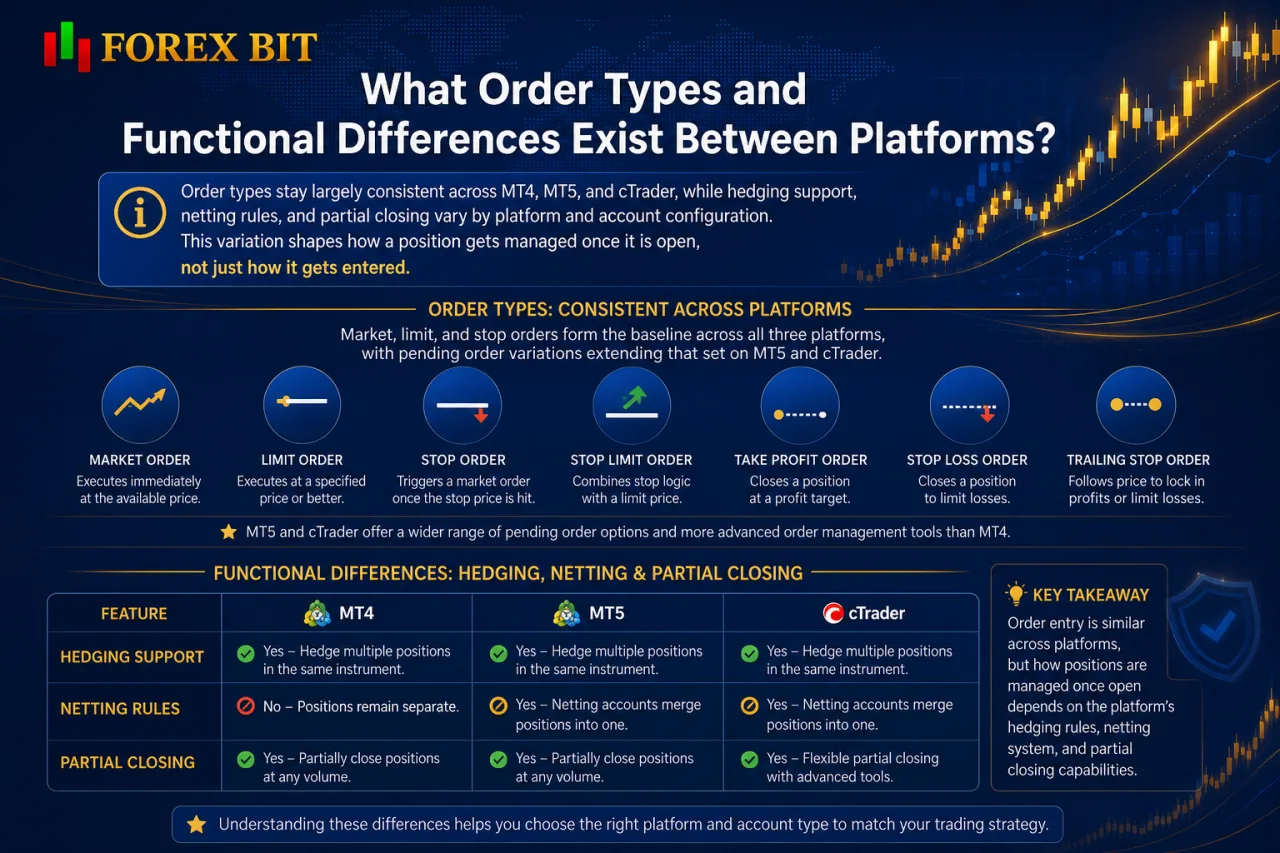
Order types stay largely consistent across MT4, MT5, and cTrader, while hedging support, netting rules, and partial closing vary by platform and account configuration. This variation shapes how a position gets managed once it is open, not just how it gets entered.
Market, limit, and stop orders form the baseline across all three platforms, with pending order variations extending that set on MT5 and cTrader.
- Market orders execute immediately at the available price on MT4, MT5, and cTrader alike.
- Limit orders queue an entry above or below the current price, common to all three platforms.
- Stop orders trigger a market entry once price reaches a set level, also standard across the group.
- Pending order options expand further on MT5, adding variations beyond MT4’s basic set.
Functional differences appear once a position is open rather than at order entry. MT4 and MT5 support both hedging accounts, which allow opposing positions on the same instrument, and netting accounts, which merge same-instrument trades into a single net position. cTrader structures positions around net exposure by default, with partial closing available on MT4, MT5, and cTrader for trimming an open trade without closing it entirely.
How Do You Choose the Right Trading Platform for Your Needs?
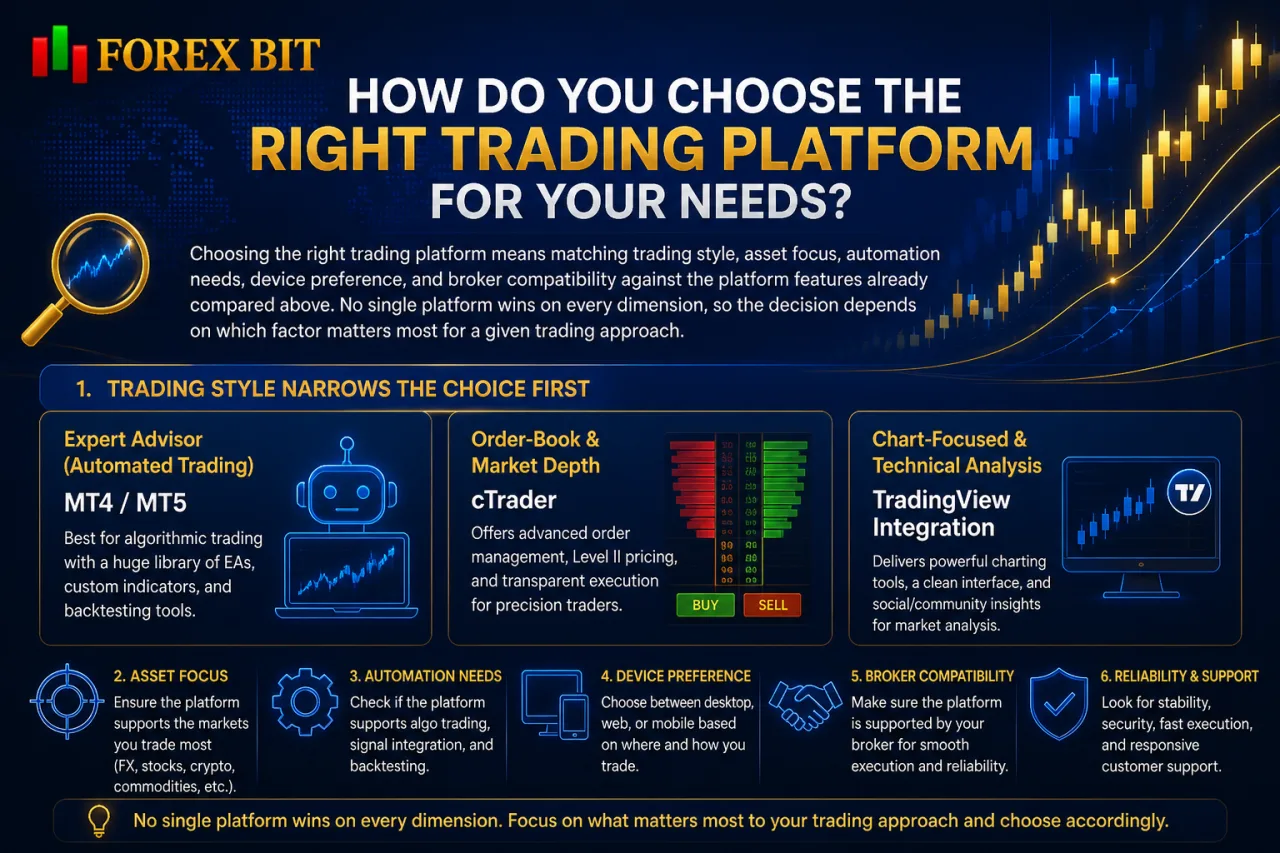
Choosing the right trading platform means matching trading style, asset focus, automation needs, device preference, and broker compatibility against the platform features already compared above. No single platform wins on every dimension, so the decision depends on which factor matters most for a given trading approach.
Trading style narrows the choice first. Traders running Expert Advisors lean toward MT4 or MT5, traders wanting order-book visibility lean toward cTrader, and chart-focused, community-driven traders lean toward TradingView.
Asset focus and automation needs follow directly from the platform comparisons already outlined:
- Selecting MT5 over MT4 fits traders needing multi-asset access beyond forex and CFDs.
- Selecting cTrader fits traders prioritising Level II pricing and execution transparency.
- Selecting TradingView fits traders prioritising charting depth and script sharing over standalone execution.
- Selecting MT4 fits traders relying on an established Expert Advisor library.
Device preference matters where mobile monitoring suffices versus where desktop automation stays necessary, since Expert Advisors and cBots run only on desktop terminals. Broker compatibility closes the decision, since platform availability differs across brokers and determines which of these options a trader can actually access.
What Are Some Lesser-Known Platform Features Worth Knowing?
Several less commonly discussed features shape how traders extend platform functionality beyond charting and basic order execution, grouped mainly into algo marketplaces, copy-trading integrations, and platform-specific backtesting tools. These niche functions sit outside the core comparisons already covered but influence how a strategy scales or gets automated within each platform.
Do Trading Platforms Support Backtesting and Strategy Optimization?
Yes, trading platforms support backtesting and strategy optimization, though the depth of these tools differs between MT4, MT5, and cTrader. MT4 runs single-threaded backtesting through its Strategy Tester, MT5 speeds this up with multi-threaded processing, and cTrader offers backtesting through cAlgo’s separate coding environment.
MT4’s Strategy Tester runs Expert Advisors against historical data one thread at a time, which extends testing time for longer data ranges or multiple parameter combinations. MT5 improves on this directly, since its multi-threaded tester processes several optimization passes in parallel rather than sequentially. cTrader takes a different route, running backtests and optimization within cAlgo rather than the main charting terminal, since cBots operate on a separate coding framework from MT4 and MT5’s MQL language.
- Testing speed favors MT5 over MT4 due to parallel processing during optimization runs.
- Coding compatibility separates cTrader’s cAlgo environment from the shared MQL base of MT4 and MT5.
- Optimization output across all three platforms typically includes profitability and drawdown metrics from historical runs.
Are There Marketplace Ecosystems for Indicators and Bots on These Platforms?
Yes, marketplace ecosystems exist for indicators and bots, mainly through MQL5 Market for MT4 and MT5 and cTrader Automate for cTrader. This pricing and distribution layer sits outside the core charting and execution comparisons already covered.
MQL5 Market lets traders buy, rent, or download free Expert Advisors and custom indicators built on the MQL language shared by MT4 and MT5. cTrader Automate serves the same purpose for cBots and custom indicators coded within cAlgo, keeping distribution separate from MetaTrader’s marketplace. TradingView supports a comparable model through its public and paid script library, where Pine Script indicators and strategies get shared or sold, though execution still depends on a connected broker rather than TradingView itself.
- Buying finished Expert Advisors or cBots removes the need to code a strategy independently.
- Renting tools on a trial basis lets traders test performance before a full purchase.
- Publishing custom indicators or scripts lets developers distribute tools to other platform users.
Conclusion
Platform selection ultimately comes down to matching MT4’s Expert Advisor ecosystem, MT5’s expanded assets and order types, cTrader’s execution transparency and Level II data, or TradingView’s charting and community strengths against a trader’s actual strategy and device habits.
Desktop terminals cover automation and deep analysis, mobile apps handle monitoring and quick order changes, and marketplace tools like MQL5 Market or cTrader Automate extend functionality without custom coding. Broker availability sets the final boundary, since not every platform is offered by every provider, making compatibility the last practical filter in the decision.