
Learn how Exness account security works—2FA setup, fund protection, and regulation—to keep your trading account safe. Read the full guide now.
Exness Account Security: Full Protection Guide for Traders

Exness protects trader accounts and funds through multi-layer security infrastructure combining encryption, segregated client funds, and regulatory oversight. Exness applies security measures such as data encryption and segregation of client funds from company operating capital. These measures work together to reduce risks of unauthorized access and fund misuse.
Two-factor authentication on Exness is enabled through the account security settings in Exness Personal Area, using an authenticator app to generate verification codes. Traders can enable two-factor authentication (2FA) on their Exness account through the account security settings and confirm it using a verification code from an authenticator app or SMS, adding an extra layer of protection beyond the password. Once activated, every login and withdrawal request requires this additional verification step.
Exness holds regulatory licenses from multiple financial authorities that oversee its operations across different jurisdictions. Exness operates under licenses and regulatory oversight from multiple financial authorities, which supervise its compliance and client protection standards. This regulatory status forms the basis for evaluating the safety of deposits and withdrawals with the broker.
Traders whose Exness account is hacked or compromised must contact Exness support immediately and complete identity verification through KYC documents to recover access. If a trader suspects their Exness account has been compromised, they should immediately change their password, review recent login activity, and contact Exness support to secure the account and verify recent transactions. Quick reporting limits potential unauthorized fund movement during the recovery process.
Forex Bit breaks down each of these protection layers in detail below, starting with how Exness secures trader accounts and funds at the platform level.
How Does Exness Protect Trader Accounts and Funds?
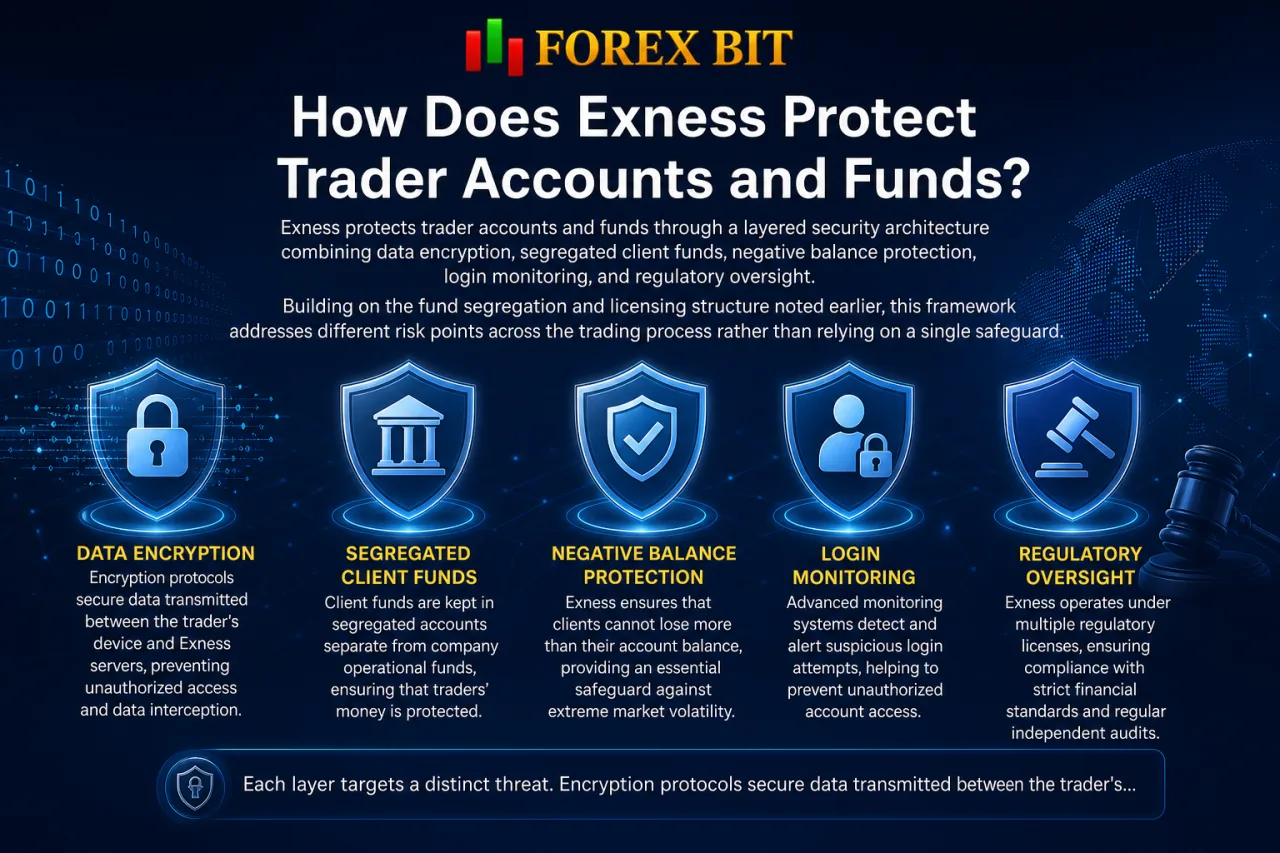
Exness protects trader accounts and funds through a layered security architecture combining data encryption, segregated client funds, negative balance protection, login monitoring, and regulatory oversight. Building on the fund segregation and licensing structure noted earlier, this framework addresses different risk points across the trading process rather than relying on a single safeguard.
Each layer targets a distinct threat:
- Encryption protocols secure data transmitted between the trader’s device and Exness servers, reducing exposure to interception during login or transactions.
- Segregation of client funds from company operating capital, already outlined above, limits the impact of company-level financial risk on trader balances.
- Negative balance protection prevents an account balance from falling below zero during volatile market moves, capping losses at the deposited amount.
- Login monitoring systems flag unusual access patterns, such as sign-ins from unrecognized devices or locations, prompting additional verification.
- Regulatory oversight from the authorities supervising Exness adds an external compliance check on how these internal controls are applied.
The following sections examine how each of these components, encryption, fund segregation, negative balance protection, login monitoring, and regulatory supervision, functions in practice.
What Security Technologies Does Exness Use to Safeguard Accounts?
Exness safeguards accounts through five core technologies: SSL/TLS encryption, secure data centers, fraud detection systems, session monitoring, and password encryption standards. Continuing from the layered architecture described above, this technology stack operates at the infrastructure level to support the fund segregation and negative balance protection already covered.
Each technology addresses a distinct point of vulnerability:
- Encrypts data in transit through SSL/TLS protocols during login and transaction requests.
- Stores account and transaction data within secure data centers protected against unauthorized physical and network access.
- Detects suspicious account activity through fraud detection systems that flag irregular transaction patterns.
- Tracks active login sessions through session monitoring tools that identify concurrent or unrecognized access points.
- Protects stored passwords through encryption standards that prevent plaintext exposure in the event of a data breach.
These technologies function together rather than in isolation, so a failure at one layer, such as a compromised password, remains partially contained by monitoring and fraud detection at other layers. This combination reduces reliance on any single defense mechanism to protect trader accounts.
How Are Client Funds Kept Safe by Exness?
Exness keeps client funds safe by holding trader deposits in segregated bank accounts separate from company operating capital, combined with negative balance protection. This approach carries forward the fund segregation principle introduced earlier, applying it specifically to how deposits are stored and protected from company-level financial exposure.
Segregated accounts hold trader money at partner banking institutions apart from the funds Exness uses for its own business operations. This separation means client deposits remain distinct from company assets, so operational expenses or corporate liabilities do not draw directly from trader balances. Negative balance protection adds a second layer by preventing an account from dropping below zero during sharp market swings, so losses stop at the amount deposited rather than creating owed debt. Together, these two mechanisms address different risks: segregation protects funds from misuse or commingling, while negative balance protection shields traders from extreme market volatility. Both measures apply automatically to eligible account types without requiring manual activation by the trader.
How to Enable and Verify Two-Factor Authentication (2FA) on Exness?
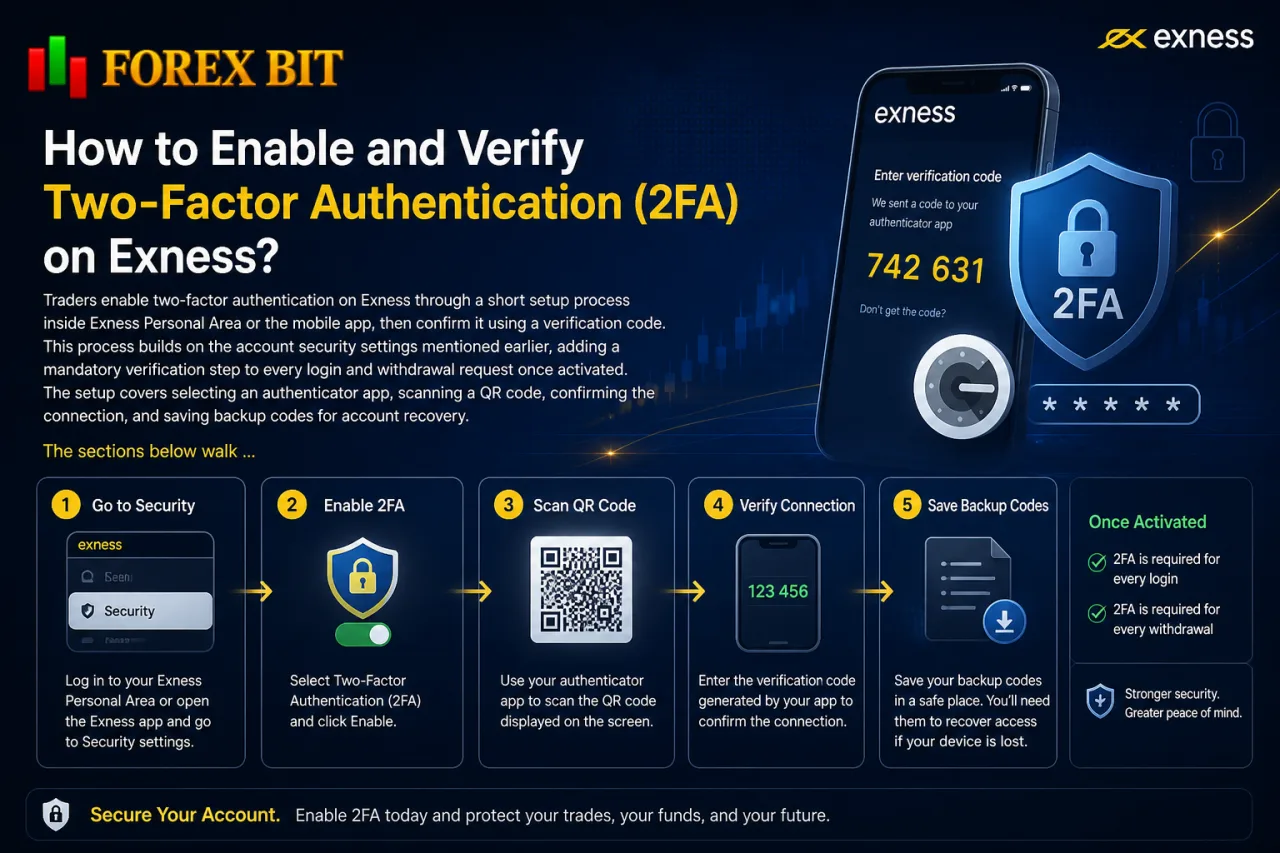
Traders enable two-factor authentication on Exness through a short setup process inside Exness Personal Area or the mobile app, then confirm it using a verification code. This process builds on the account security settings mentioned earlier, adding a mandatory verification step to every login and withdrawal request once activated. The setup covers selecting an authenticator app, scanning a QR code, confirming the connection, and saving backup codes for account recovery. The sections below walk through each part of this process, from choosing an authenticator app to verifying the setup and storing backup access codes.
What Are the Steps to Set Up 2FA in the Exness Personal Area?
Traders set up 2FA in Exness Personal Area through five steps: opening security settings, selecting an authenticator app, scanning a QR code, entering a verification code, and confirming activation. This sequence follows directly from the account security settings referenced earlier, converting a password-only login into a two-step verification process.
The steps proceed as follows:
- Log in to Exness Personal Area and navigate to the account security or profile settings section.
- Locate the two-factor authentication option and select the setup or enable button.
- Open an authenticator app on a mobile device and scan the QR code displayed on screen to link the account.
- Enter the verification code generated by the authenticator app into the confirmation field on the setup page.
- Confirm activation, after which the system saves the 2FA connection and applies it to future logins and withdrawal requests.
Once confirmed, Exness applies the verification step to subsequent logins and withdrawal requests without further manual configuration.
What Should You Do If You Lose Access to Your 2FA Device?
Traders who lose access to their 2FA device recover account access through backup codes saved during initial setup, or by contacting Exness support for identity verification if no backup codes remain. This recovery path follows directly from the 2FA setup process described earlier, where the system generates backup codes at the time of activation for exactly this scenario.
The recovery process runs through the following steps:
- Enter a saved backup code at the login screen instead of the authenticator app code, restoring access without further verification.
- Contact Exness support directly if backup codes are unavailable or already used.
- Submit identity verification documents matching the KYC records on the account to confirm ownership.
- Wait for support to review the submitted documents before 2FA is reset or disabled temporarily.
- Set up 2FA again on a new authenticator app once account access is restored, saving a fresh set of backup codes.
Backup codes generated during setup exist specifically to prevent lockout, so storing them in a separate secure location from the mobile device running the authenticator app remains important. Without backup codes, the identity verification step through Exness support becomes the only route back into the account.
Is Exness Regulated and Safe to Trust with Deposits and Withdrawals?
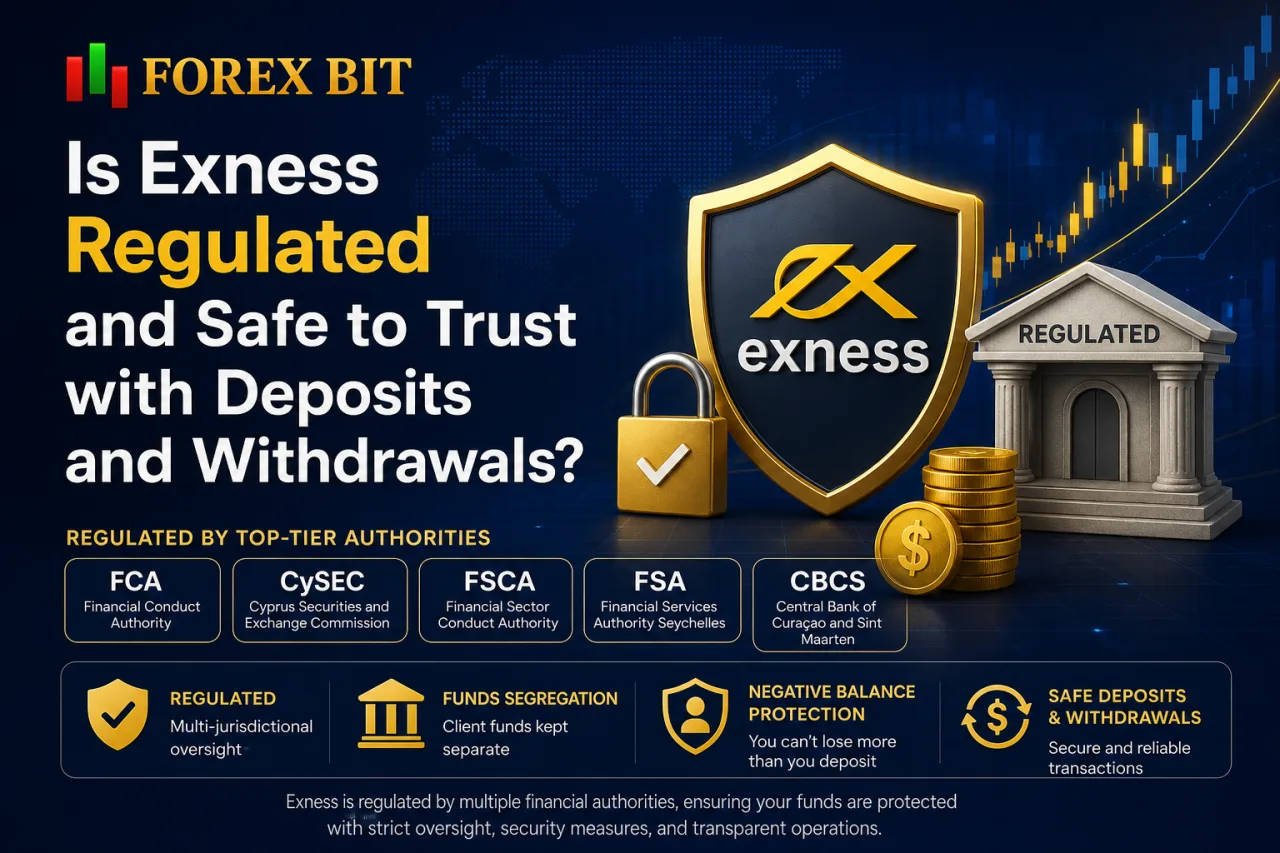
Exness operates under licenses and regulatory oversight from multiple financial authorities, which places deposits and withdrawals under external regulatory supervision. This multi-jurisdictional licensing structure connects directly to the fund segregation and negative balance protection already described, adding a layer of external supervision on top of internal controls. The following sections examine which regulators oversee Exness and how their supervision translates into practical safety for client funds.
Each regulator applies its own set of compliance requirements to the Exness entity operating under its jurisdiction. Oversight from bodies such as the FCA and CySEC typically involves capital adequacy checks, reporting obligations, and rules governing how client money gets held. This external review process means the segregated account structure and withdrawal handling described earlier remain subject to periodic verification rather than relying solely on internal company policy.
Which Regulators Currently License Exness?
Exness operates under licenses and regulatory oversight from multiple financial authorities, spanning different jurisdiction categories such as major European regulators, offshore financial authorities, and regional supervisory bodies, each covering a different scope of client protection. This grouping follows the multi-jurisdictional oversight structure noted earlier, where different Exness entities operate under separate regulatory frameworks depending on the trader’s region.
Regulators supervising Exness generally fall into a few categories based on the strength of protection they apply:
- Tier-one European regulators, such as the FCA and CySEC, enforce requirements around capital adequacy, client fund segregation, and access to dispute resolution mechanisms for eligible traders.
- Offshore or regional authorities license Exness entities serving clients outside Europe, applying local compliance standards that vary in scope and enforcement depth.
The specific entity a trader registers with determines which regulator applies, and that assignment typically depends on the trader’s country of residence at account opening.
How Does Regulation Affect the Safety of Deposits and Withdrawals?
Regulation affects the safety of deposits and withdrawals by enforcing licensing requirements that mandate fund segregation, capital adequacy, and access to dispute resolution mechanisms. This regulatory impact builds on the licensing structure covered earlier, translating oversight from bodies such as the FCA and CySEC into concrete transaction-level protections rather than abstract compliance status.
Licensing requirements enforce these protections through distinct mechanisms:
- Mandates segregation of client deposits from company operating funds at partner banking institutions, preventing commingling with corporate assets.
- Requires the regulated entity to maintain minimum capital reserves, reducing the risk that a shortfall in company finances disrupts withdrawal processing.
- Establishes reporting obligations that subject internal fund-handling practices to periodic external verification.
- Provides eligible traders access to a formal dispute resolution channel through the regulator when a withdrawal or deposit issue remains unresolved through standard support.
These requirements apply differently depending on which Exness entity and regulator governs a trader’s account, since tier-one regulators generally enforce stricter capital adequacy and dispute resolution standards than offshore authorities. The specific compliance obligations and enforcement depth vary by jurisdiction and regulator.
What to Do If Your Exness Account Is Hacked or Compromised?
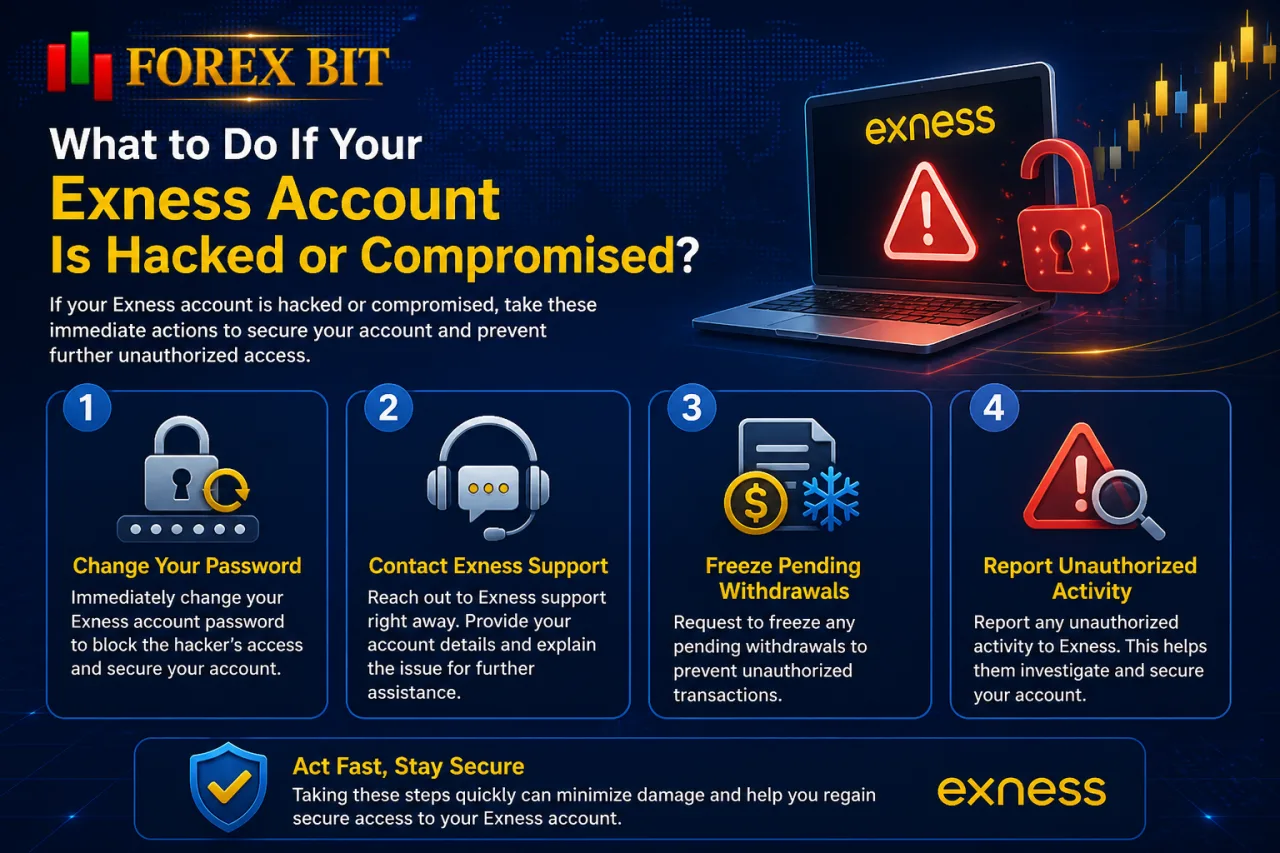
Traders whose Exness account is hacked or compromised respond through four immediate actions: changing the password, contacting Exness support, freezing pending withdrawals, and reporting unauthorized activity. This response sequence extends the recovery process outlined earlier for 2FA lockouts, addressing a broader compromise scenario where login credentials themselves may be exposed. Each action targets a different stage of containment, from stopping further access to alerting Exness for account-level intervention. The following sections break down how password changes, support contact, withdrawal freezes, and activity reporting each apply during this process.
How to Recover a Compromised Exness Account Through KYC Verification?
Traders recover a compromised Exness account through KYC verification by submitting identity documents to Exness support, who then confirm ownership before restoring access and resetting security credentials. This process extends the password change and support contact steps outlined earlier, applying specifically when standard security answers no longer confirm the account belongs to the trader requesting recovery.
The KYC-based recovery process runs through the following steps:
- Contacts Exness support through the official Personal Area channel or verified support email to report the compromised account.
- Submits a government-issued identification document matching the name registered on the account, such as a passport or national ID.
- Provides a proof of address document, such as a utility bill or bank statement, matching the account’s registered details.
- Completes a selfie or photo verification step in some cases to confirm the documents belong to the person requesting access.
- Waits for the Exness compliance team to cross-check submitted documents against existing account records before granting access.
Once verification succeeds, Exness resets the password and disables any active 2FA connection tied to the compromised device, allowing the trader to set up fresh security credentials. Mismatched or incomplete documents extend the review timeline, since the compliance team requires matching records before restoring account control.
What Are the Warning Signs of a Compromised Exness Account?
Warning signs of a compromised Exness account fall into four groups: unrecognized login alerts, unexpected trades, changed contact details, and failed 2FA notifications. This set of indicators extends the KYC recovery process outlined earlier, giving traders concrete signals to watch for before that recovery step becomes necessary.
Each group points to a different stage where unauthorized access may already be occurring:
- Receives a login alert or notification email referencing a device or location not recognized by the account owner.
- Notices open positions, pending orders, or closed trades that the trader did not place.
- Finds the registered email address, phone number, or withdrawal payment method changed without the trader’s action.
- Gets repeated failed 2FA verification notifications, suggesting someone attempted to log in without the correct authenticator code.
These signals often appear together rather than in isolation, since an attacker gaining partial access typically attempts further actions such as altering contact details or placing trades before the trader notices. Spotting any single sign among this group warrants immediate password change and contact with Exness support, following the recovery steps already described above.
What Additional Security Tools Does Exness Offer Beyond Standard Protections?
Exness offers several additional security tools beyond standard protections, including device management, login notification settings, biometric login, and withdrawal confirmation alerts. These tools extend the encryption, fund segregation, and 2FA layers already described, giving traders finer control over how their account gets accessed and monitored on a daily basis. The following sections break down how each of these lesser-known features functions within the Exness Personal Area and mobile app.
How Does Exness Mobile App Biometric Login Enhance Security?
The Exness Trade app enhances security through biometric login, letting fingerprint or face ID unlock the app instead of typing a password each time. This feature builds on the device management and login notification tools mentioned earlier, adding a hardware-based verification layer on top of password and 2FA protections already in place.
Biometric login ties access to the physical device and the trader’s unique fingerprint or facial data, stored locally on the device rather than transmitted to Exness servers. This setup prevents someone with only the account password from opening the app, since the biometric match against the enrolled device remains a separate requirement.
The feature applies at the app level rather than replacing 2FA on withdrawals or Personal Area logins from a browser. Traders enable it through the app’s security settings once biometric data is already registered on the mobile device itself.
How Can Traders Manage Trusted Devices and Login Alerts in Exness?
Traders manage trusted devices and login alerts in Exness through the security settings menu in Personal Area, viewing active sessions, removing unrecognized devices, and configuring email or SMS notifications for new logins. This device management layer extends the biometric login and 2FA tools described earlier, giving traders a direct view into which devices currently hold access to the account.
The device management panel lists each active session with details such as device type, location, and last access time, letting a trader spot an unfamiliar entry at a glance. Removing an unrecognized device from this list logs it out immediately and forces a fresh login with the current password and 2FA code. Login alert settings run separately from device management, sending an email or SMS notification whenever a new device or location signs into the account.
These two controls work together: alerts flag a new login as it happens, while the active sessions list confirms whether that login belongs to the trader or requires removal. Enabling both settings closes a gap that password and 2FA protections alone do not fully cover, since a stolen 2FA code combined with an already logged-in session could otherwise go unnoticed without session-level visibility.
Conclusion
Exness protects trader accounts and funds through a combination of layered defenses working at different stages of the trading process: encryption and secure infrastructure at the technical level, segregated bank accounts and negative balance protection at the financial level, two-factor authentication and biometric login at the access level, and licensing from multiple financial authorities at the compliance level.
Device management tools and login alerts close remaining visibility gaps, while a clear KYC-based recovery path addresses compromised accounts directly. Together, these measures give traders concrete, verifiable safeguards covering account access, fund storage, and regulatory accountability, addressing the core question of how Exness secures deposits and withdrawals for both new and existing clients.
William Johnson is a Forex & Broker News Analyst at Forex Bit, focusing on broker updates, regulatory developments, payment changes, and security-related news. His work helps readers stay informed about important industry developments and understand how these changes may affect broker services and trading conditions.
Email: [email protected]


Best Brokers

Trade with the world’s largest retail broker and benefit from better - than - market conditions.

We offer a superior trading environment that puts traders in the best position to profit.

Trade with the best trading conditions. WIN THE BEST TRADING ACCOUNT AWARD.

Trade global markets with Interactive Brokers – a highly regulated multi-asset broker built for active and professional investors.





Forex Bit provides independent forex broker reviews, comparisons, guides, and industry news to help traders make informed decisions.
Best Brokers
Metatrader 5 Brokers
Metatrader 4 Brokers
Lowest Spread Forex Broker
Regulated Forex Brokers
Forex Copy Trading
Ctrader Brokers
Best Forex Broker For Beginners