
Compare Pepperstone vs XM account types, spreads, leverage and platforms to find the better fit for your trading style in 2026.
Pepperstone vs XM: Account Types & Trading Conditions

Pepperstone suits active and cost-sensitive traders with tighter raw spreads, while XM appeals to beginners through its no-minimum-deposit Micro account and flexible entry conditions. Both brokers structure their account types around different trading priorities, making the right choice dependent on trading style and capital size.
Pepperstone’s Razor account is generally structured with tighter spreads plus a commission, while XM’s Standard account tends to bundle slightly wider spreads with no added commission. Minimum deposit requirements also differ, with XM generally allowing smaller starting capital compared to Pepperstone’s entry-level accounts.
Pepperstone supports leverage up to a regulator-dependent cap and runs on MT4, MT5 and cTrader, while XM offers higher leverage tiers on MT4 and MT5 in regions where regulations permit it. Instrument range also varies, with each broker offering different coverage across forex, indices, and commodities.
Scalpers and high-volume traders generally align better with Pepperstone’s raw-spread structure, while beginners and copy traders often find XM’s low-entry accounts more accessible. Forex Bit breaks down these structural differences to clarify which broker fits which trading approach, starting with how Pepperstone and XM compare across account types and overall trading conditions.
Pepperstone vs XM: Which Broker Offers Better Account Types and Trading Conditions?
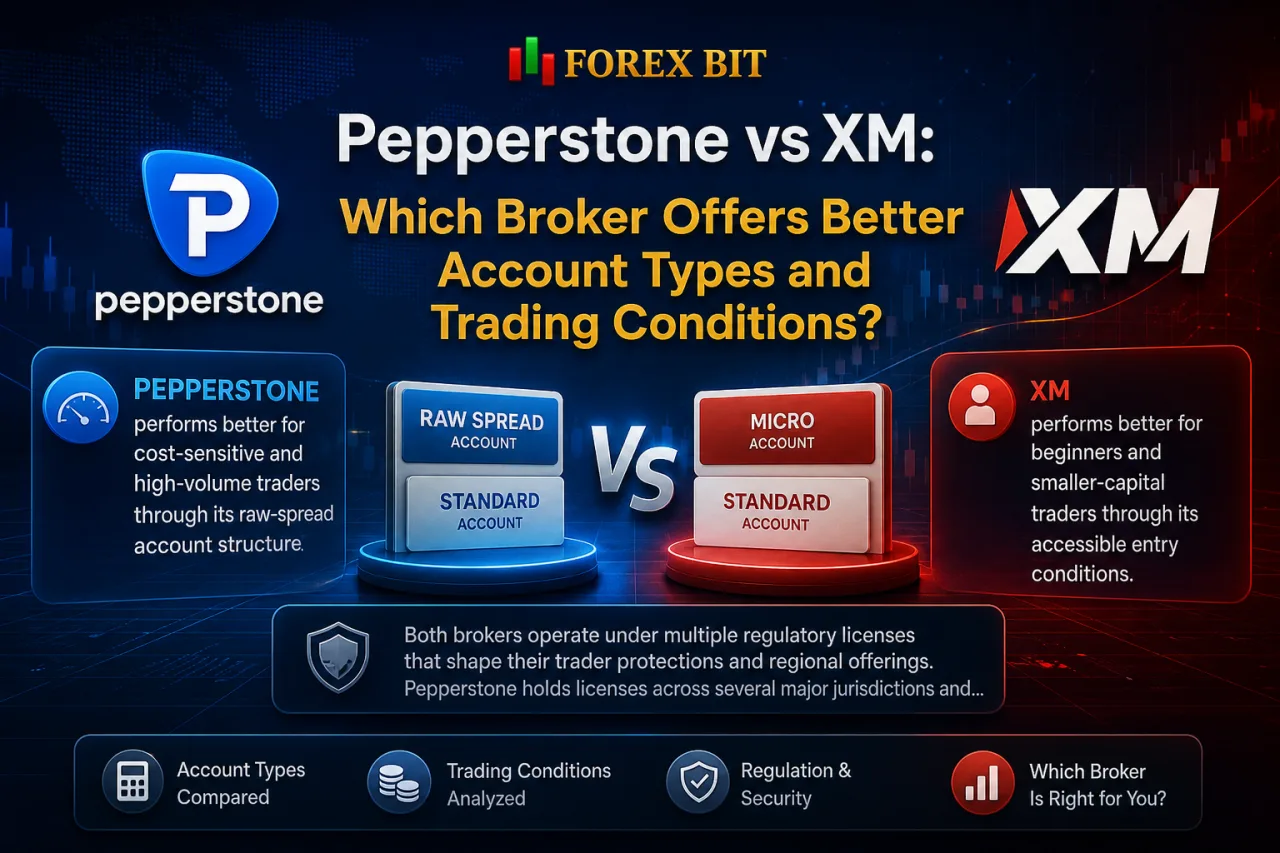
Pepperstone performs better for cost-sensitive and high-volume traders through its raw-spread account structure, while XM performs better for beginners and smaller-capital traders through its accessible entry conditions. This framing sets up the deeper comparison of account types and trading conditions covered next.
Both brokers operate under multiple regulatory licenses that shape their trader protections and regional offerings. Pepperstone holds licenses across several major jurisdictions and positions itself toward active, technically-oriented traders who prioritize execution speed and cost efficiency.
XM likewise operates under multiple regulatory entities and targets a broader trader base, including newcomers seeking low barriers to entry.
The comparison ahead examines how these differing trader profiles translate into concrete differences across account structures, spread and commission models, leverage limits, platform availability, and instrument coverage between Pepperstone and XM.
What Account Types Do Pepperstone and XM Offer?
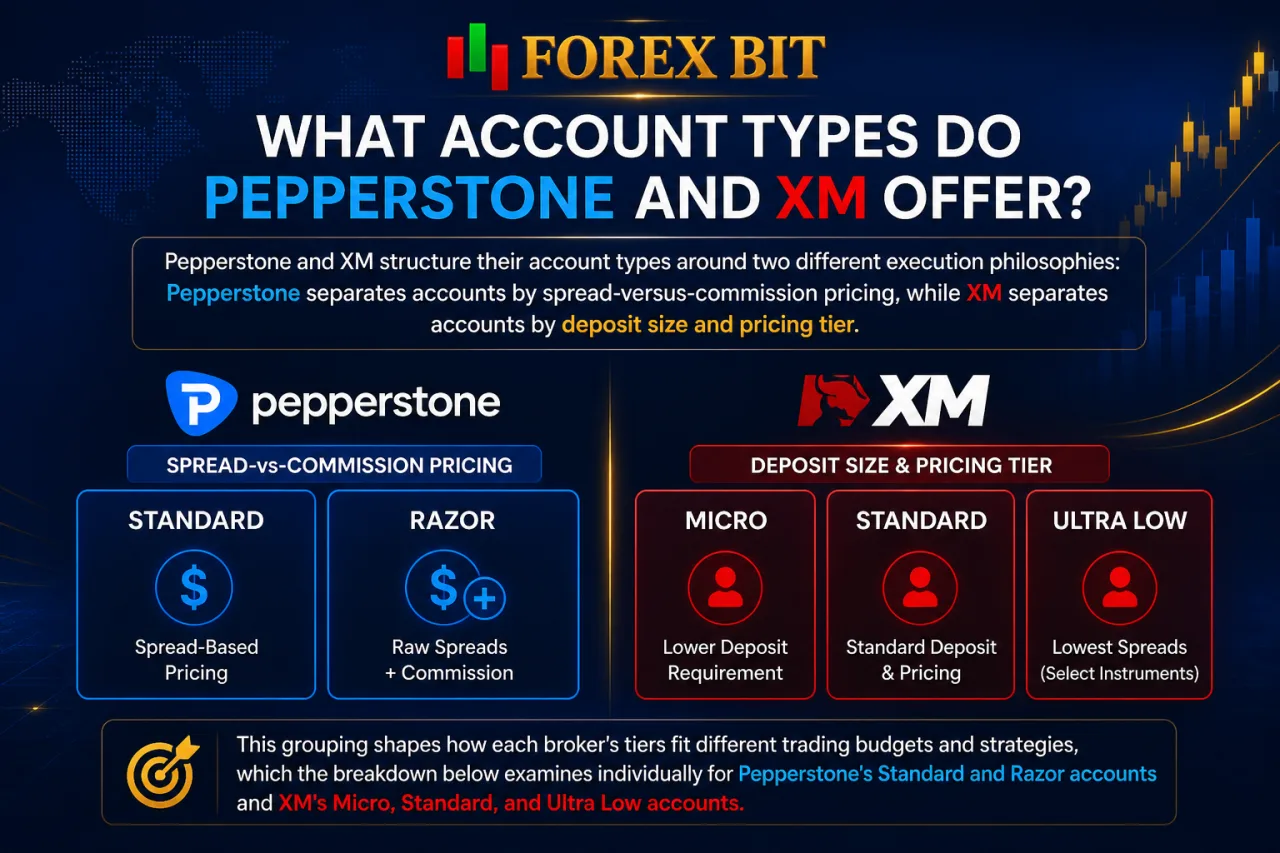
Pepperstone and XM structure their account types around two different execution philosophies: Pepperstone separates accounts by spread-versus-commission pricing, while XM separates accounts by deposit size and pricing tier. This grouping shapes how each broker’s tiers fit different trading budgets and strategies, which the breakdown below examines individually for Pepperstone’s Standard and Razor accounts and XM’s Micro, Standard, and Ultra Low accounts.
How Do Pepperstone’s Standard and Razor Accounts Differ?
Pepperstone’s Standard account bundles the spread cost with no separate commission, while the Razor account charges a tighter raw spread plus a fixed commission per lot. This pricing split defines which trader profile fits each tier within Pepperstone’s account structure.
The Standard account suits beginners and lower-frequency traders who prefer predictable, all-in pricing without tracking a separate commission line. Pepperstone’s Razor account is generally positioned for scalpers, algorithmic traders, and high-volume participants who benefit from tighter, commission-based spreads.
Execution speed also factors into the choice between the two tiers. Traders running high-frequency strategies or expert advisors typically favor Razor because the lower spread markup reduces cost per trade at scale, while occasional traders find the Standard account simpler to manage without commission calculations.
Both accounts remain available across Pepperstone’s supported platforms, meaning the choice between Standard and Razor depends primarily on trading frequency and cost sensitivity rather than platform access.
How Do XM’s Micro, Standard and Ultra Low Accounts Differ?
XM’s Micro account differs from its Standard and Ultra Low tiers primarily through lot-size flexibility, while Standard applies conventional lot sizing and Ultra Low reduces spread cost. This distinction across XM’s three tiers shapes which account fits a trader’s capital size and cost preference.
- Micro account: Allows position sizing in smaller increments than the Standard account, giving newer traders finer control over risk exposure when testing strategies with limited capital. This makes the Micro account better suited to beginners who prefer trading smaller volumes while adjusting to live market conditions.
- Standard account: Applies conventional lot sizing with spread-inclusive pricing and no added commission, aligning with XM’s broader positioning toward traders who want straightforward, all-in cost structures without calculating separate fees.
- Ultra Low account: Narrows spreads compared to Standard, appealing to traders who prioritize lower per-trade cost while still avoiding a commission-based pricing model.
Traders choosing between these tiers typically weigh position-size flexibility against spread tightness rather than platform access, since all three accounts share the same underlying execution environment.
How Do Spreads, Commissions and Minimum Deposit Compare Between Pepperstone and XM?
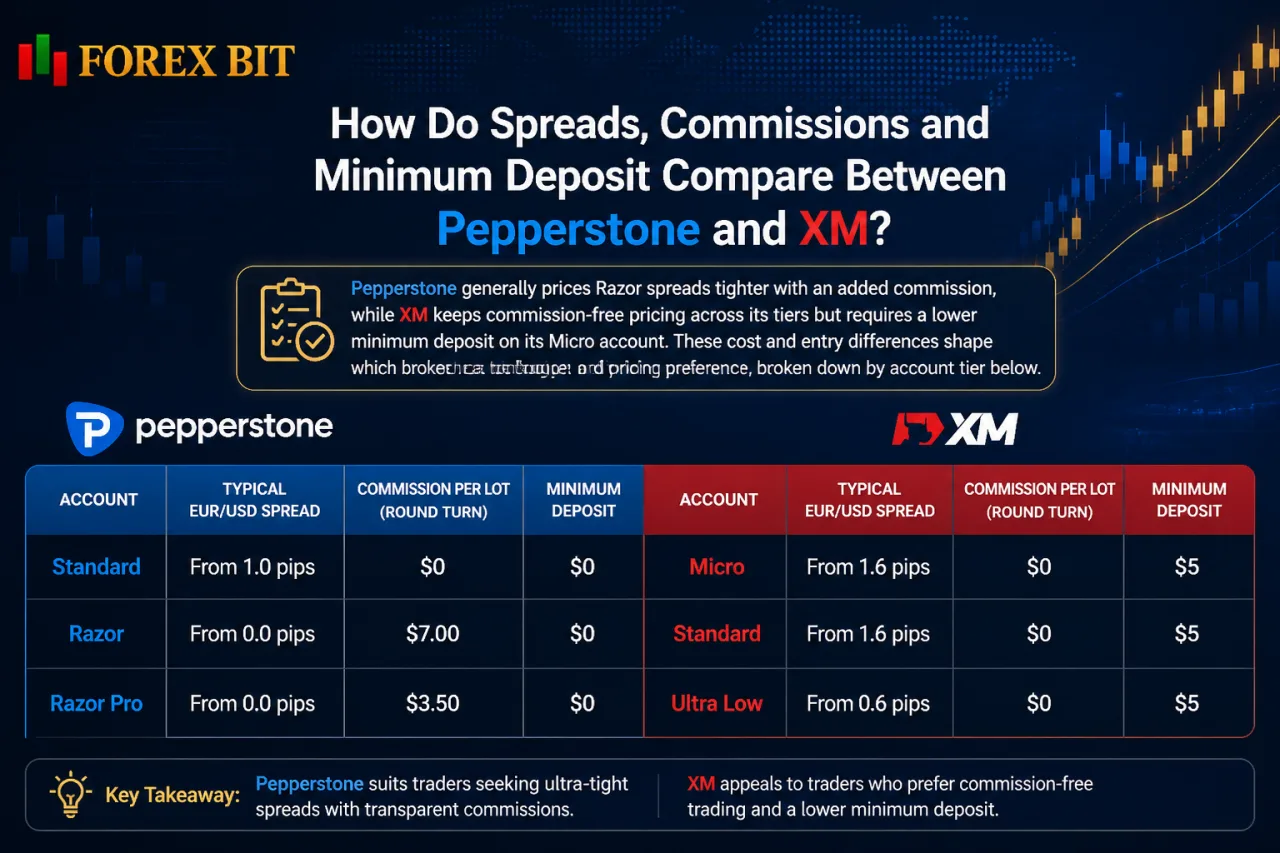
Pepperstone generally prices Razor spreads tighter with an added commission, while XM keeps commission-free pricing across its tiers but requires a lower minimum deposit on its Micro account. These cost and entry differences shape which broker fits a trader’s budget and pricing preference, broken down by account tier below.
| Broker | Account | Typical EUR/USD Spread | Commission per Lot | Minimum Deposit |
|---|---|---|---|---|
| Pepperstone | Standard | Spread-only pricing, no added commission | None | Refer to Pepperstone’s official website for the current figure |
| Pepperstone | Razor | Tighter raw spread plus a per-lot commission | Charged per lot, refer to Pepperstone’s official website for the current figure | Refer to Pepperstone’s official website for the current figure |
| XM | Micro | Commission-free spread pricing | None | Refer to XM’s official website for the current figure |
| XM | Standard | Commission-free spread pricing | None | Refer to XM’s official website for the current figure |
| XM | Ultra Low | Commission-free spread pricing, positioned as XM’s tighter-spread tier | None | Refer to XM’s official website for the current figure |
Pepperstone’s Razor account remains the broker’s only commission-based tier, while its Standard account keeps a spread-only model similar to XM’s approach across all three of its tiers.
Minimum deposit requirements separate the two brokers most clearly, since XM’s Micro account generally allows a smaller starting balance than Pepperstone’s entry-level Standard account. Traders should verify the exact spread, commission, and minimum deposit figures directly on each broker’s official website before opening an account, since these terms are updated periodically.
Which Broker Has Lower Minimum Deposit Requirements?
XM generally sets a lower minimum deposit requirement through its Micro account, while Pepperstone applies no fixed minimum deposit across its Standard and Razor accounts. This entry-barrier gap directly affects which broker fits traders starting with limited capital.
XM’s tiered structure ties deposit size to account type, with the Micro account positioned as the lowest-cost entry point among its three tiers. XM’s Micro account requires a comparatively small minimum deposit, making it accessible for beginners testing live conditions with limited funds.
Pepperstone, by contrast, does not enforce a strict minimum deposit on either Standard or Razor accounts, though practical trading with standard lot sizes still benefits from adequate capital to manage margin and risk properly. This structural difference means beginners with very small starting capital often gravitate toward XM’s Micro account, while Pepperstone’s flexibility suits traders who prefer choosing their own funding level without a fixed threshold.
Which Broker Offers Lower Trading Costs on Raw Spread Accounts?
Pepperstone’s Razor account generally delivers lower net trading costs for high-frequency traders through its raw-spread-plus-commission model, while XM’s Ultra Low account keeps costs commission-free but with comparatively wider raw spreads. This cost gap centers on how each broker structures commission versus spread markup on its lowest-cost tier.
Pepperstone’s Razor account typically charges a commission per lot alongside a tighter raw spread.
As of the time of this review, XM does not list a separate Zero account alongside Ultra Low in its current lineup, so the Ultra Low tier remains XM’s closest comparison point to Pepperstone’s Razor for cost-focused traders. Account naming and structure can change over time, so traders should confirm the current account lineup directly on XM’s official website before opening an account.
XM’s Ultra Low account avoids a per-lot commission charge, folding all cost into a narrowed spread instead.
For high-frequency and algorithmic traders executing large lot volumes, the combined spread-plus-commission structure on Pepperstone’s Razor account typically produces a lower total cost per round-turn trade than XM’s commission-free Ultra Low pricing, since raw spreads tend to compress further as trade volume increases. Traders placing fewer, larger trades may find XM’s Ultra Low model simpler to calculate without tracking a separate commission line.
How Do Leverage, Platforms and Tradable Instruments Differ Between Pepperstone and XM?
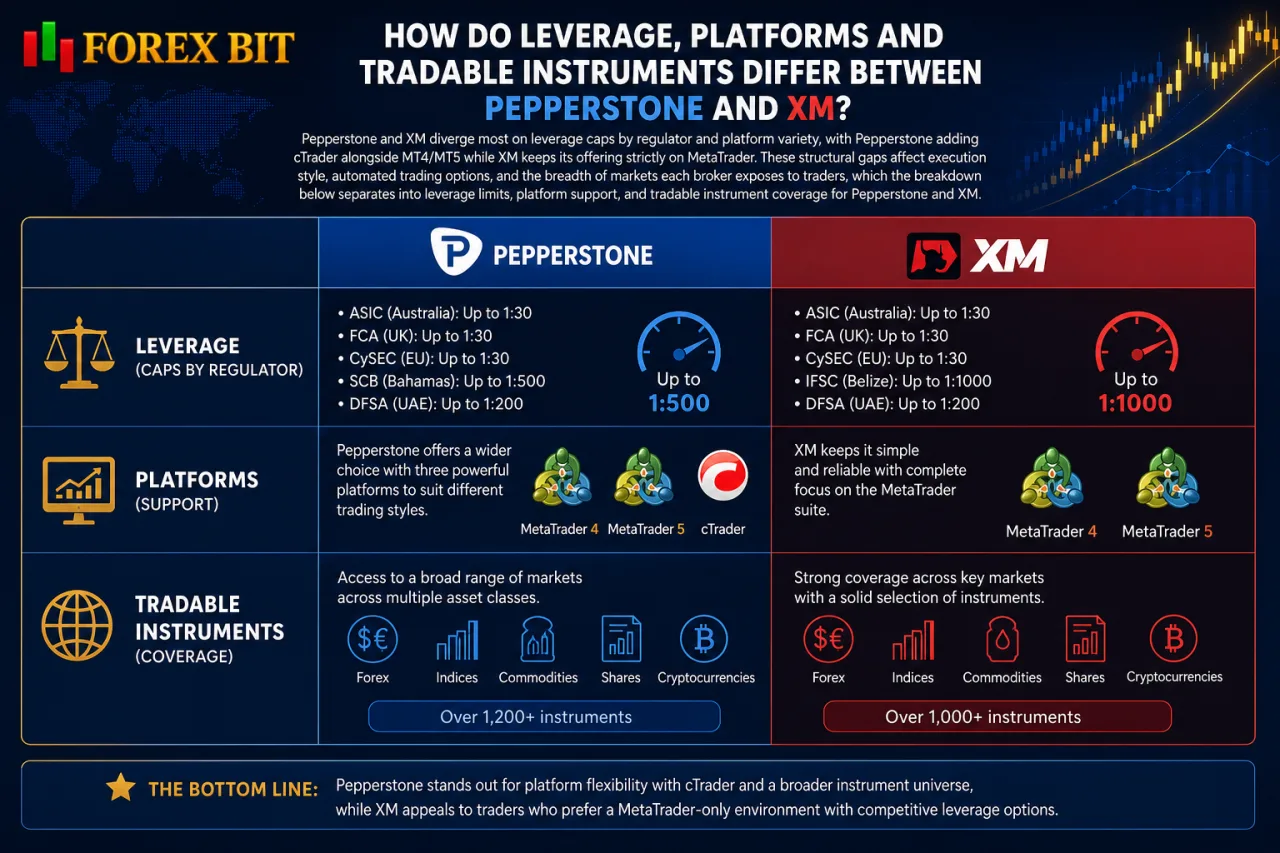
Pepperstone and XM diverge most on leverage caps by regulator and platform variety, with Pepperstone adding cTrader alongside MT4/MT5 while XM keeps its offering strictly on MetaTrader. These structural gaps affect execution style, automated trading options, and the breadth of markets each broker exposes to traders, which the breakdown below separates into leverage limits, platform support, and tradable instrument coverage for Pepperstone and XM.
Which Broker Offers Higher Leverage and How Does It Vary by Region?
Pepperstone’s maximum leverage tends to stay capped at lower ratios under tier-1 regulators like the FCA and ASIC, while XM’s offshore entities tend to extend leverage considerably higher for clients trading outside strict jurisdictions. This regulatory split defines how much leverage each broker’s clients access depending on where they register their account.
Pepperstone’s licensed entities under the FCA, ASIC, and CySEC apply retail leverage restrictions consistent with each regulator’s investor-protection rules, meaning UK, Australian, and EU-based clients face the same lower caps regardless of trading experience. Clients onboarded through Pepperstone’s less-restrictive entities may access higher leverage where local rules permit it.
XM operates a similar split across its regulatory entities, with clients under stricter European or UK-aligned licenses facing comparable caps to Pepperstone, while accounts opened through XM’s offshore-regulated entities qualify for substantially higher leverage tiers. This structure tends to make XM’s leverage ceiling higher for eligible non-EU, non-UK clients compared to Pepperstone’s equivalent offshore offering.
Traders in restricted jurisdictions receive the same lower leverage from both brokers, so the meaningful gap only appears among clients eligible for offshore account registration.
Is MT4 or MT5 Better Supported by Pepperstone or XM?
Pepperstone and XM both support full MT4/MT5 feature parity, but Pepperstone extends its platform ecosystem further through cTrader and TradingView integration, while XM relies on a proprietary WebTrader and mobile app alongside MetaTrader. This platform gap affects execution style options beyond the core MT4/MT5 comparison already covered above.
Both brokers run MT4 and MT5 with equivalent order types, charting tools, and expert advisor support, so traders migrating between Pepperstone and XM find no functional loss on either version. Execution speed on MT4/MT5 depends primarily on account type and server location rather than broker-specific platform limitations, since both brokers route orders through comparable infrastructure for their respective account tiers.
Pepperstone differentiates itself by offering cTrader as a third platform option, giving traders access to Level II pricing and native TradingView chart integration not available through XM. This appeals to traders who prefer cTrader’s algorithmic tools or want direct TradingView charting tied to live order execution.
XM instead concentrates its non-MetaTrader development on its proprietary WebTrader and mobile app, offering browser-based and app access without installing MT4 or MT5. Traders prioritizing platform variety and advanced charting integration generally lean toward Pepperstone, while those wanting a simpler proprietary web and app experience alongside MetaTrader tend to favor XM.
Which Broker Provides a Wider Range of Trading Instruments?
Pepperstone provides deeper coverage in indices and share CFDs, while XM extends broader access to crypto CFDs across more of its regulated regions. This instrument-range gap affects which broker fits traders wanting diversified exposure beyond core forex pairs.
Both brokers cover major, minor, and exotic forex pairs at comparable depth, so the meaningful difference sits in non-forex categories. Pepperstone lists a wide selection of global indices, commodities, and share CFDs sourced from major exchanges.
XM structures its instrument catalog around forex, commodities, indices, stocks, and metals, with crypto CFDs available depending on the client’s regulatory entity. XM’s crypto CFD availability tends to narrow or disappear for clients registered under stricter regulators such as the FCA or CySEC.
Traders prioritizing equity and index diversity generally lean toward Pepperstone, while those wanting crypto CFD exposure alongside standard forex trading may find XM’s offering more accommodating where regional rules allow it.
Which Broker’s Account Structure Suits Beginners, Scalpers or Active Traders Better?
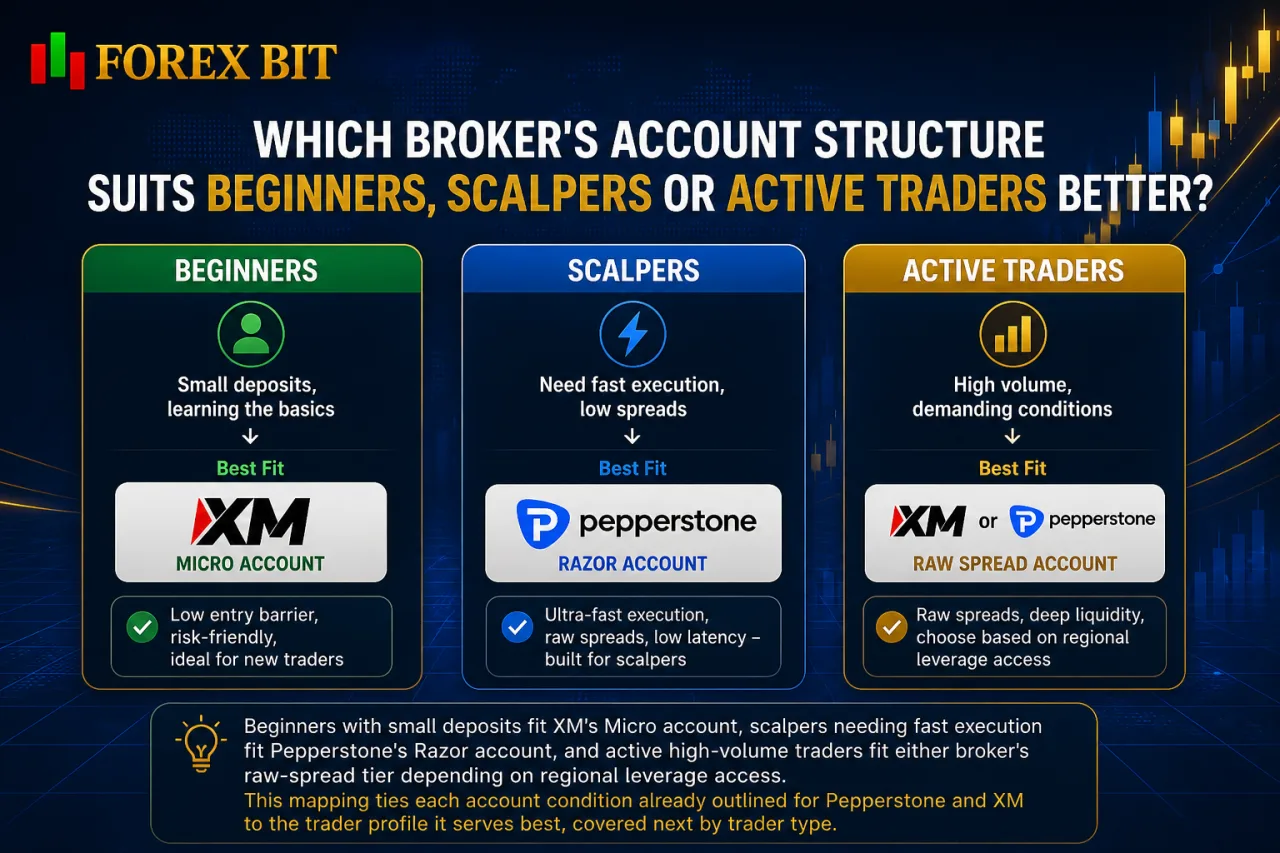
Beginners with small deposits fit XM’s Micro account, scalpers needing fast execution fit Pepperstone’s Razor account, and active high-volume traders fit either broker’s raw-spread tier depending on regional leverage access. This mapping ties each account condition already outlined for Pepperstone and XM to the trader profile it serves best, covered next by trader type.
Which Broker Is Better Suited for Beginners Based on Account Requirements?
XM better suits beginners on account requirements through its Micro account’s low entry deposit and flexible lot sizing, while Pepperstone appeals to beginners mainly through its simpler two-tier structure. This onboarding gap ties directly back to the deposit and account-tier differences already outlined between the two brokers.
XM’s Micro account removes much of the friction new traders face when opening a first live account, since its lower minimum deposit and reduced lot-size increments allow position sizing that matches limited starting capital. This structure lets beginners practice risk management on real market conditions without committing to standard lot volumes upfront.
Pepperstone’s onboarding experience instead relies on simplicity rather than granular sizing. With only Standard and Razor as choices, new traders avoid the tier confusion that can come with multiple account levels, though Pepperstone’s Standard account still assumes a trader is comfortable with conventional lot sizing rather than the finer increments XM’s Micro tier provides.
Traders prioritizing a smaller upfront deposit and flexible position sizing generally find XM’s Micro account more accommodating for a first trading experience, while those who prefer fewer account choices and straightforward spread-only pricing may lean toward Pepperstone’s Standard account instead.
Which Broker Is More Suitable for Scalpers and Active Traders?
Pepperstone suits scalpers better through faster execution and tighter Razor spreads, while XM fits active traders who prioritize commission-free pricing on its Ultra Low account. This execution-versus-pricing split ties directly to the trading style requirements each broker’s account structure accommodates.
Pepperstone’s Razor account routes orders through infrastructure optimized for low-latency execution, which benefits scalping strategies that depend on minimal slippage between order placement and fill. Pepperstone generally permits scalping and expert advisor use across its account types, including Razor, without imposing specific restrictions on high-frequency strategies.
XM likewise allows scalping and automated trading across its account tiers, though its Ultra Low account keeps pricing commission-free rather than optimizing purely for raw spread compression. XM’s policy permits scalping strategies but does not emphasize the same execution-speed positioning that Pepperstone applies to Razor.
Traders running high-frequency or algorithmic strategies generally lean toward Pepperstone’s Razor account for its tighter spread-plus-commission model, while active traders preferring simpler cost tracking may favor XM’s Ultra Low tier.
What Other Trading Conditions Should Be Considered Beyond Spreads and Account Types?
Pepperstone and XM differ in four niche but relevant conditions beyond spreads and account tiers: swap-free eligibility, order execution model, base currency support, and payment method coverage. These factors influence longer-term cost management and funding convenience rather than per-trade pricing already outlined for account types above. Each factor carries different implications depending on trading style, religious trading requirements, and preferred funding region, which the breakdown below separates individually across swap-free availability, execution nuances, currency support, and deposit or withdrawal handling for Pepperstone and XM.
Do Pepperstone and XM Offer Swap-Free (Islamic) Accounts?
Yes, both Pepperstone and XM offer swap-free accounts, though eligibility and account scope differ between the two brokers. This swap-free comparison ties directly into the account-type and cost structures already outlined for Pepperstone and XM.
Pepperstone provides swap-free trading as an Islamic account option available across its Standard and Razor accounts, generally requiring clients to apply and confirm eligibility on religious grounds.
XM similarly offers swap-free trading across its Micro, Standard, and Ultra Low accounts, generally applying a comparable underlying spread and commission structure to its standard tiers.
Both brokers restrict swap-free status from applying to every instrument, with some symbols excluded or subject to administrative fees in place of swap charges. Traders holding positions overnight under religious trading requirements find comparable coverage from either broker, though confirming exact instrument exclusions with each broker’s current terms remains necessary before opening a swap-free account.
How Do Deposit and Withdrawal Methods Differ Between Pepperstone and XM?
Pepperstone and XM both support bank transfer, card payments, and e-wallets, though fees and processing speed differ by method and region. This funding comparison builds on the swap-free and account-tier differences already outlined for Pepperstone and XM.
Pepperstone’s e-wallet and card withdrawals tend to process faster, while bank transfers generally take longer to clear depending on the receiving institution.
Pepperstone generally does not charge its own withdrawal fee across most supported payment methods, though intermediary bank charges may apply on wire transfers depending on the receiving institution. Traders are advised to check the current fee schedule directly on Pepperstone’s official website before withdrawing funds, since payment provider terms are subject to change.
XM similarly supports bank transfer, card, and e-wallet funding, with e-wallet and card transactions generally processing faster than bank transfers, which tend to take longer depending on the receiving institution.
XM generally does not charge its own deposit fees across most funding channels, though third-party payment processors may deduct charges independently.
Traders prioritizing faster e-wallet withdrawals find comparable turnaround from either broker, while those relying on bank transfers face longer clearing times regardless of which broker they choose.
Conclusion
The account and trading condition differences between Pepperstone and XM map onto two distinct trader profiles. Pepperstone’s Razor account, tighter execution focus, and cTrader access fit scalpers, algorithmic traders, and high-volume participants who value raw spreads and platform variety.
XM’s Micro account, lower entry deposit, and flexible lot sizing fit beginners and smaller-capital traders easing into live markets, while its offshore leverage tiers and Ultra Low account also draw active traders wanting commission-free pricing. Both brokers match on swap-free eligibility and funding channel coverage, leaving trading style and starting capital, not overall broker quality, as the deciding factor between Pepperstone and XM.
Michael Smith is a Forex Broker Comparison Specialist at Forex Bit, focusing on comparing brokers, trading platforms, account types, fees, spreads, commissions, and trading conditions. His work helps readers understand the key differences between providers so they can evaluate brokers based on their own trading needs and preferences.
Email: [email protected]


Best Brokers

Trade with the world’s largest retail broker and benefit from better - than - market conditions.

We offer a superior trading environment that puts traders in the best position to profit.

Trade global markets with Interactive Brokers – a highly regulated multi-asset broker built for active and professional investors.

Invest and trade global markets with eToro – a Nasdaq-listed multi-asset platform built around social investing and CopyTrader.






Forex Bit provides independent forex broker reviews, comparisons, guides, and industry news to help traders make informed decisions.
Best Brokers
Metatrader 5 Brokers
Metatrader 4 Brokers
Lowest Spread Forex Broker
Regulated Forex Brokers
Forex Copy Trading
Ctrader Brokers
Best Forex Broker For Beginners