
Compare MetaTrader vs TradingView on charting tools, broker integration & usability to find the right platform for your Forex trading style.
MetaTrader vs TradingView: Charting & Broker Integration

MetaTrader wins on broker-side automation and native trade execution, while TradingView wins on charting depth and visual analysis tools. Traders choosing between the two platforms face a tradeoff between algorithmic trading infrastructure and superior chart interface design.
TradingView offers advanced charting tools and a wide library of technical indicators, which traders often compare with MetaTrader’s charting capabilities. Its layout and drawing tools are generally considered more intuitive for multi-timeframe technical analysis.
MetaTrader connects directly with Forex brokers through built-in server connections, enabling live order execution without relying on third-party bridges. TradingView, in contrast, relies on broker-specific plugins or API bridges for live trading functionality.
Beginners generally find TradingView’s interface easier to navigate, while experienced traders often prefer MetaTrader’s algorithmic trading capabilities. This difference in learning curve shapes which platform suits which trading style. Forex Bit breaks down these distinctions further below, starting with how MetaTrader and TradingView compare directly for charting and broker integration.
MetaTrader vs TradingView: Which Platform Wins for Charting and Broker Integration?
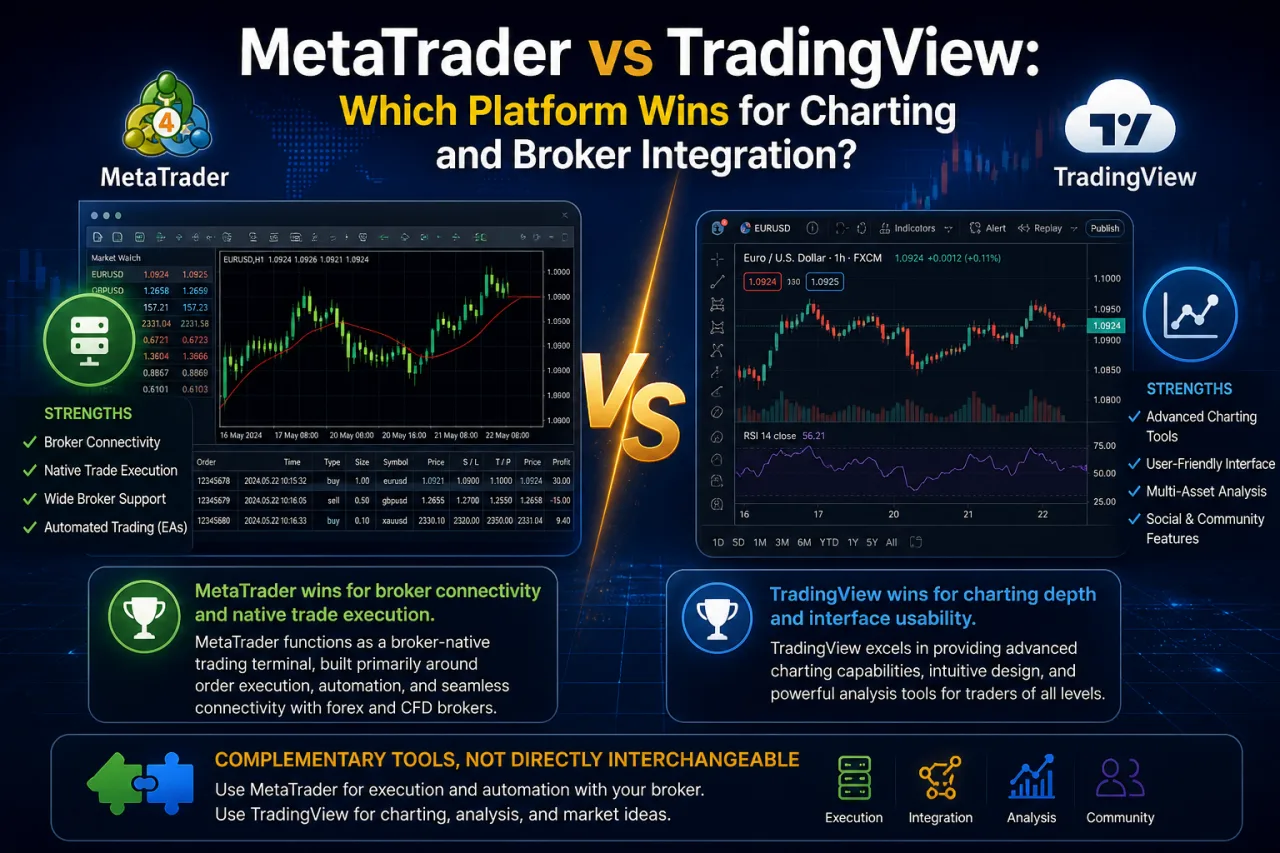
MetaTrader wins for broker connectivity and native trade execution, while TradingView wins for charting depth and interface usability, positioning them as complementary rather than directly interchangeable tools. This framing sets the scope for comparing the two platforms specifically on charting, broker integration, and overall usability rather than repeating standard MT4 vs MT5 feature debates.
MetaTrader functions as a broker-native trading terminal, built primarily around order execution, account management, and automated strategy deployment through direct server connections to Forex brokers. TradingView operates as a web-based charting and social platform, prioritizing visual market analysis, community-shared scripts, and cross-market comparisons over broker-level trade infrastructure.
The comparison scope centers on three areas: charting capability, the depth of broker connectivity, and how each platform handles day-to-day usability for traders. These distinctions matter more than platform version differences, since MetaTrader’s execution-first design and TradingView’s analysis-first design lead traders toward different workflows depending on whether their priority is chart interpretation or direct order placement.
Which Platform Offers Better Charting Tools and Technical Analysis Features?
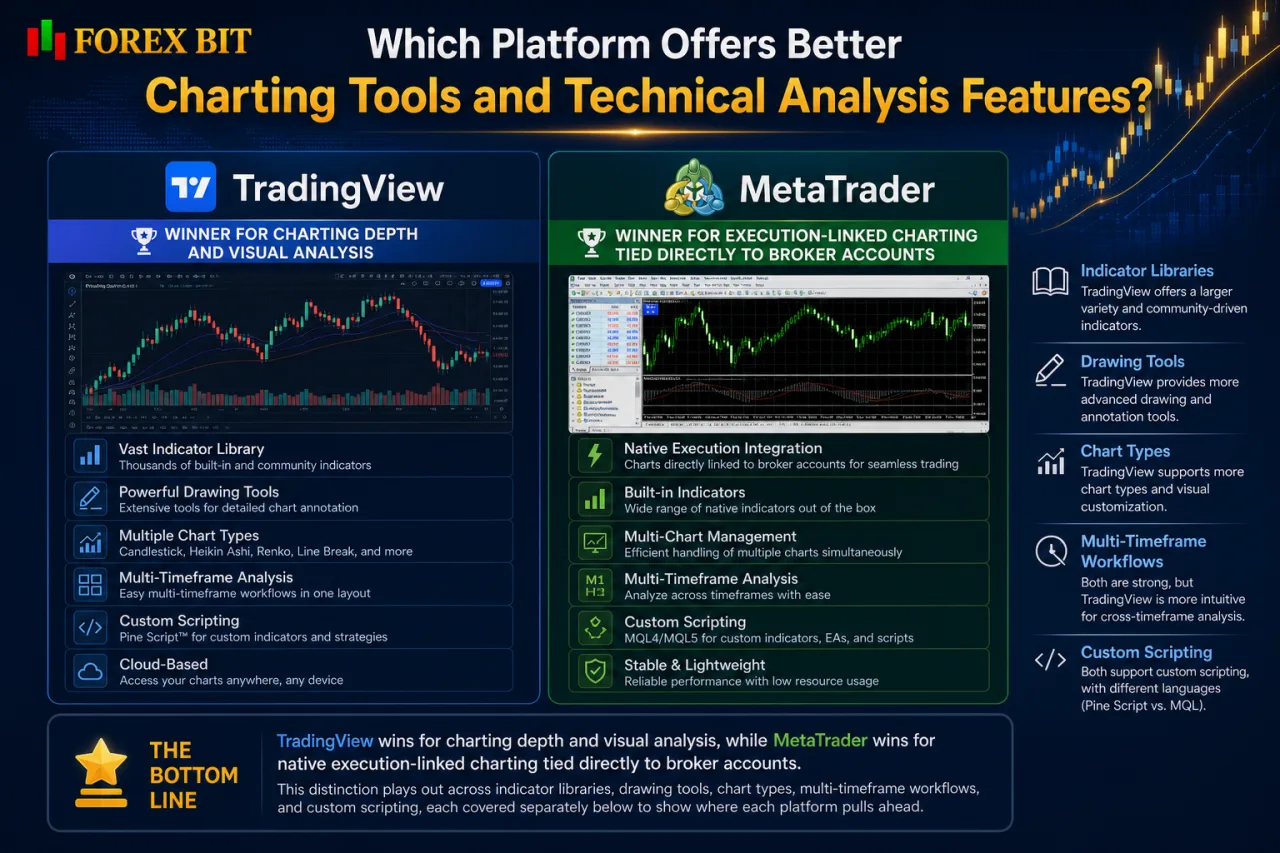
TradingView wins for charting depth and visual analysis, while MetaTrader wins for native execution-linked charting tied directly to broker accounts. This distinction plays out across indicator libraries, drawing tools, chart types, multi-timeframe workflows, and custom scripting, each covered separately below to show where each platform pulls ahead.
What Charting Capabilities Does MetaTrader Provide?
MetaTrader provides a broker-native charting engine built around multiple timeframes, a built-in indicator library, MQL-based custom indicators and Expert Advisors, and a standard set of chart object tools. This structure ties charting directly to trade execution rather than treating analysis as a separate function.
The platform’s charting stack centers on functional depth rather than visual polish, which shapes how traders interact with it day to day.
- Offers a fixed set of timeframes ranging from one-minute to monthly charts.
- Includes a built-in library of standard technical indicators covering trend, momentum, and volume categories.
- Supports custom indicators and automated Expert Advisors coded in MQL4 or MQL5.
- Provides chart object tools such as trendlines, Fibonacci tools, and geometric shapes for manual annotation.
- Limits visual customization compared to more design-focused charting platforms, with fewer layout and styling options for chart appearance.
This execution-linked design keeps MetaTrader’s charts connected to live broker accounts, but its interface customization remains more restrictive than platforms built primarily for visual analysis.
What Charting Capabilities Does TradingView Provide?
TradingView provides a cloud-based charting engine built around Pine Script scripting, community-built indicators, flexible multi-chart layouts, and cross-device chart syncing. This structure separates chart analysis from broker execution entirely, keeping every layout and study tied to a user account rather than a trading terminal.
The platform’s charting stack centers on visual customization and shared scripting rather than execution-linked functionality.
- Renders charts through cloud infrastructure, allowing instant access from any browser without local software installation.
- Supports Pine Script for building custom indicators and strategies, separate from MetaTrader’s MQL-based system.
- Hosts a public library of community-built indicators and scripts shared across the TradingView user base.
- Arranges multiple chart layouts side by side within a single workspace for cross-market or multi-timeframe comparison.
- Syncs saved layouts, drawings, and indicator settings automatically across desktop, tablet, and mobile devices.
This cloud-based approach favors visual flexibility and shared analytical tools, while broker-side execution remains dependent on external integrations rather than a native terminal connection.
How Does Each Platform Integrate With Forex Brokers for Live Trading?
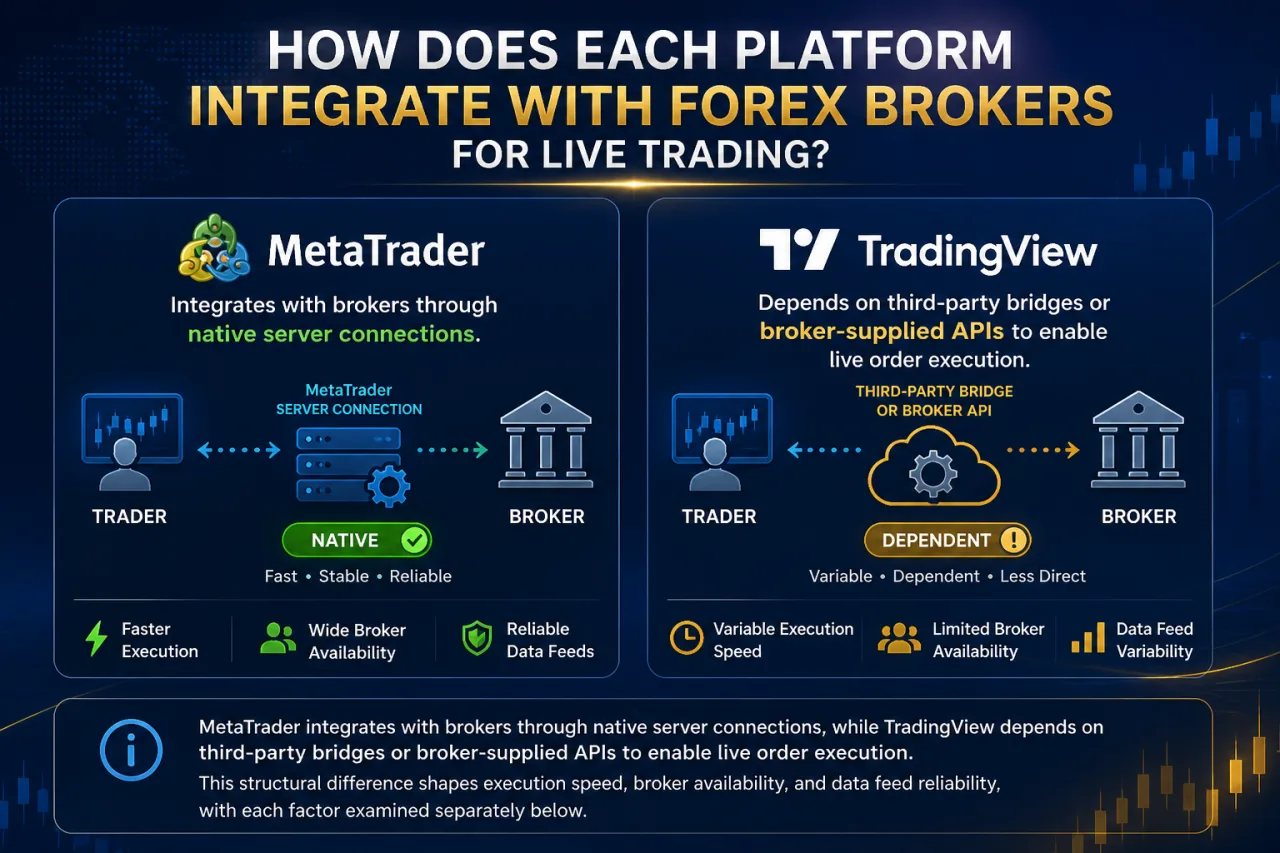
MetaTrader integrates with brokers through native server connections, while TradingView depends on third-party bridges or broker-supplied APIs to enable live order execution. This structural difference shapes execution speed, broker availability, and data feed reliability, with each factor examined separately below.
How Does MetaTrader Connect to Forex Brokers?
MetaTrader connects to Forex brokers through a native client-server architecture, where the trading terminal links directly to a broker-hosted MT4 or MT5 server. This connection method ties charting, order execution, and account data into a single continuous session rather than routing through an external bridge.
The client-server model routes every price update and order request through the broker’s own MetaTrader server infrastructure. Brokers configure their own MT4 or MT5 server instance, then distribute broker-specific login credentials that point the MetaTrader terminal to that exact server address.
- Establishes a direct socket connection between the trader’s terminal and the broker’s server for real-time price streaming.
- Executes buy and sell orders on the broker’s server without passing through a third-party API layer.
- Synchronizes account balance, open positions, and order history automatically once login credentials are entered.
- Supports automated Expert Advisor trading that places and manages orders directly on the connected broker server.
Because this architecture is standardized across the industry, most regulated Forex brokers offer MetaTrader by default rather than building proprietary terminals, since it eliminates the need for custom execution infrastructure. This standardization also helps explain why MetaTrader is widely supported among regulated retail Forex brokers.
How Does TradingView Connect to Forex Brokers for Trading?
TradingView connects to Forex brokers through third-party bridge services or broker-supplied API integrations rather than a native server link, requiring a separate connection layer between the chart and the trading account. This bridge-based model addresses how TradingView handles live order execution despite lacking MetaTrader’s built-in broker terminal.
Unlike MetaTrader’s direct socket connection to a broker server, TradingView routes orders through partner brokers that have built dedicated integrations with the platform. Only brokers included in TradingView’s supported partner list, or those offering a compatible API, allow trade execution directly from the TradingView chart interface.
- Requires a listed partner broker or an API bridge to enable order placement from within TradingView.
- Routes trade requests through the broker’s own execution system rather than a TradingView-hosted server.
- Displays real-time price data on the chart independently of whether live trading is connected, since charting and execution operate as separate functions.
- Limits automated strategy deployment to brokers that support Pine Script-based alerts or webhook-triggered orders through external bridges.
This layered structure means TradingView’s broker connectivity depends on external integration support, differing from MetaTrader’s direct client-server model covered earlier.
Which Platform Is Easier to Use for Beginners vs Experienced Traders?
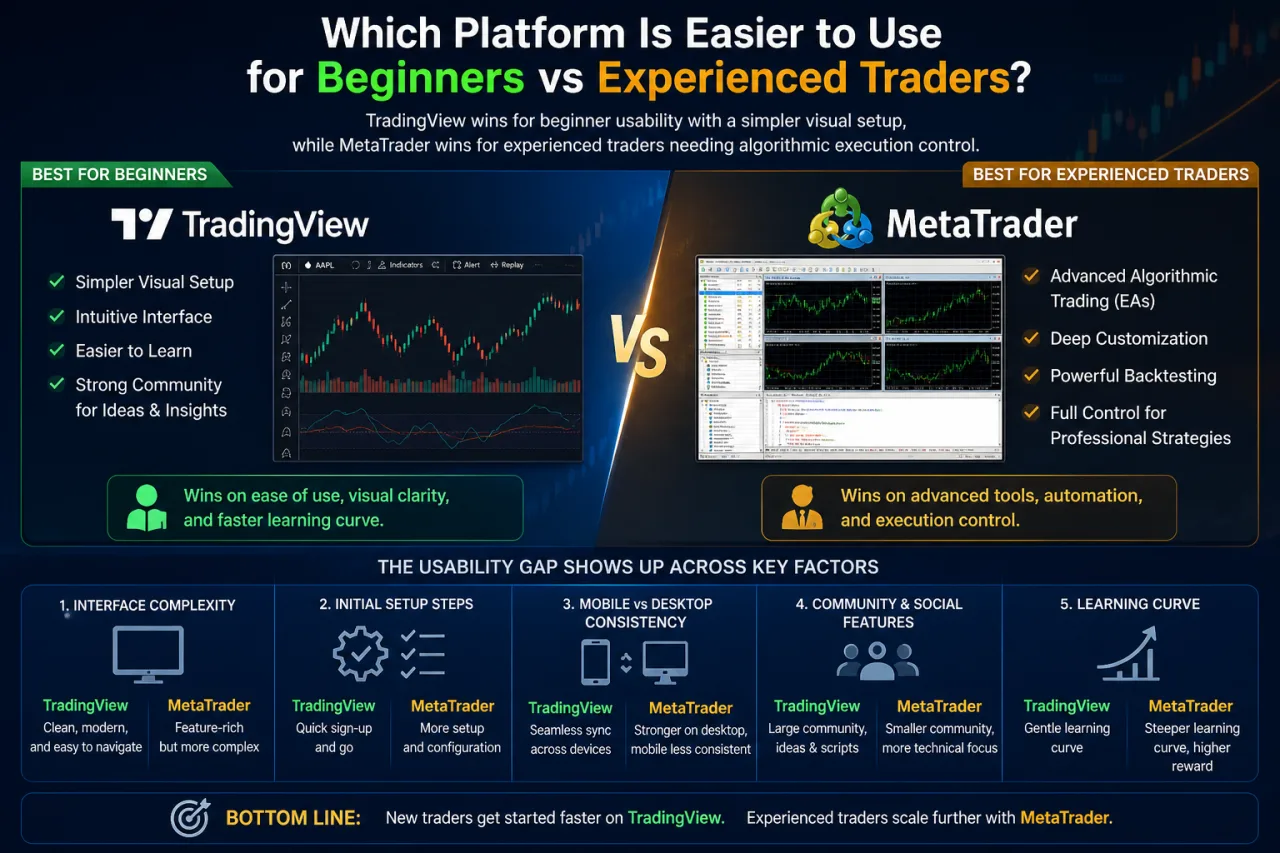
TradingView wins for beginner usability with a simpler visual setup, while MetaTrader wins for experienced traders needing algorithmic execution control. This usability gap shows up across interface complexity, initial setup steps, mobile versus desktop consistency, and how community features shape the learning curve on each platform, with each factor broken down separately below.
Is MetaTrader Beginner-Friendly or Built for Experienced Traders?
MetaTrader offers a beginner-friendly order execution layer but shifts into a steeper learning curve once traders move into advanced charting customization and Expert Advisor automation. This split addresses whether MetaTrader leans beginner-friendly or expert-oriented rather than treating it as one fixed difficulty level.
Placing a market order, setting a stop loss, or checking account balance requires only a few clicks within the terminal, since these functions sit on a straightforward order panel separate from the charting workspace. New users typically manage basic trade execution without prior platform training.
The learning curve steepens once traders attempt tasks beyond basic order placement:
- Configuring custom indicators or Expert Advisors requires familiarity with MQL4 or MQL5 coding syntax.
- Adjusting chart layouts and visual styling involves more manual setup than platforms built for visual customization.
- Backtesting automated strategies demands understanding of the Strategy Tester’s parameter settings.
- Managing multiple broker server connections adds setup steps absent from simpler single-account platforms.
This dual profile positions MetaTrader as accessible for straightforward execution tasks, while advanced charting and automation features push the platform toward traders with more technical trading experience.
Is TradingView Easier to Learn Than MetaTrader?
Yes, TradingView is easier to learn than MetaTrader for beginners, since its web interface requires no software installation, download, or broker login before traders start reading charts. This ease-of-entry gap addresses whether TradingView’s learning curve stays flatter than MetaTrader’s setup process for new users.
Opening a browser tab and searching a currency pair puts a full chart in front of a new trader within seconds, without configuring a server connection or entering broker credentials first. TradingView’s community-shared charts add a second layer of accessibility, since beginners study public analysis posts and copy indicator setups from other users rather than building a workspace from scratch.
Three factors separate TradingView’s learning curve from MetaTrader’s setup requirements:
- Skips broker server configuration, since charting functions independently of any live trading account.
- Displays indicators and drawing tools through a visual menu rather than requiring coding knowledge upfront.
- Offers community-published chart layouts that new users copy directly instead of building custom setups.
This browser-first, community-supported structure keeps TradingView’s initial learning curve flatter than MetaTrader’s terminal-based setup, which was addressed in the earlier comparison of MetaTrader’s execution-linked beginner workflow.
What Are the Lesser-Known Technical Differences Between MetaTrader and TradingView?
MetaTrader and TradingView diverge on three lesser-known technical points: data feed latency, alert delivery methods, and scripting language limitations that shape advanced strategy building. These differences rarely surface in basic feature comparisons, yet they directly affect execution timing and automation flexibility. The sections below break down data latency, notification systems, and scripting constraints separately.
How Do Data Feed Latency and Alert Systems Differ Between the Two Platforms?
TradingView delivers chart data through cloud-hosted feeds with browser-based alerts, while MetaTrader streams tick data directly from the broker’s server through terminal-based alert windows. This split affects how time-sensitive strategies receive price confirmation and notification timing.
TradingView’s alerts trigger through its server infrastructure and reach traders via app notifications, email, or webhook calls to external bridges, independent of whether the chart window stays open. This server-side alert processing introduces a delay between price movement and notification delivery compared to a direct broker feed.
MetaTrader’s tick data streams straight from the connected broker’s server, tying alert timing to that specific server’s price feed rather than a shared cloud source. Terminal-based alerts in MetaTrader sound only while the platform runs on the trader’s device, unlike TradingView’s cloud alerts that fire regardless of whether the app stays active.
- Depends on broker server quality for MetaTrader’s tick accuracy, since each broker feeds its own price stream.
- Requires an active terminal session for MetaTrader alerts to trigger locally.
- Operates independently of device status for TradingView’s cloud-based alert delivery.
- Relies on external bridge integrations for TradingView alerts to convert into live orders.
Scalping strategies built on second-by-second price shifts weigh these latency and delivery differences more heavily than swing trading approaches.
Can Pine Script and MQL Scripts Be Converted Between Platforms?
No, Pine Script and MQL scripts cannot be converted between platforms through a direct or automated process, since the two languages rely on different syntax structures and execution environments. This limitation directly affects traders trying to move indicators or strategies between MetaTrader and TradingView rather than rebuilding them from scratch.
Three technical constraints explain why cross-platform conversion stays manual rather than automatic:
- Structures Pine Script around TradingView’s cloud-based rendering engine, incompatible with MQL4 or MQL5’s terminal-based compiler.
- Ties MQL scripts to broker-side execution functions such as order placement, which Pine Script cannot replicate since TradingView charts operate independently from broker terminals.
- Requires manual rewriting of logic and syntax by a developer familiar with both languages, since no official conversion tool exists from either platform. Third-party freelance services and paid conversion tools advertise Pine Script to MQL migration, though their accuracy and reliability are not independently verified.
Traders needing the same strategy on both platforms typically rebuild the logic separately in each language rather than relying on a converted copy.
Conclusion
The core tradeoff between these platforms comes down to execution infrastructure versus visual analysis power. MetaTrader’s native client-server connection to broker accounts delivers direct order execution, algorithmic trading through MQL, and terminal-based alerts tied to live tick data, favoring experienced traders and automation-focused strategies.
TradingView’s cloud engine, Pine Script library, and community-shared layouts create a flatter learning curve and stronger charting environment, though live trading still depends on bridges or partner broker APIs. Neither platform replaces the other outright: traders prioritizing chart depth and ease of entry gravitate toward TradingView, while those needing direct broker execution and automated strategy deployment rely on MetaTrader.
Michael Smith is a Forex Broker Comparison Specialist at Forex Bit, focusing on comparing brokers, trading platforms, account types, fees, spreads, commissions, and trading conditions. His work helps readers understand the key differences between providers so they can evaluate brokers based on their own trading needs and preferences.
Email: [email protected]
Best Brokers

Trade with the world’s largest retail broker and benefit from better - than - market conditions.

We offer a superior trading environment that puts traders in the best position to profit.

Invest and trade global markets with eToro – a Nasdaq-listed multi-asset platform built around social investing and CopyTrader.

Trade with the best trading conditions. WIN THE BEST TRADING ACCOUNT AWARD.






Forex Bit provides independent forex broker reviews, comparisons, guides, and industry news to help traders make informed decisions.
Best Brokers
Metatrader 5 Brokers
Metatrader 4 Brokers
Lowest Spread Forex Broker
Regulated Forex Brokers
Forex Copy Trading
Ctrader Brokers
Best Forex Broker For Beginners